
Affiliate Disclosure: This article contains affiliate links. If you purchase through a qualifying link, we may earn a commission at no additional cost to you. This review is based on published product specifications, available product information, visible customer feedback, comparison research, and practical buying considerations. We have not personally conducted hands-on testing of the VXE Dragonfly R1 Review.
Quick Verdict: VXE Dragonfly R1 Review
The VXE Dragonfly R1 is a lightweight wireless gaming mouse family that combines a compact symmetrical shape with modern PixArt sensors, rechargeable batteries, 2.4GHz wireless connectivity, wired USB-C operation, and multiple model configurations.
The supplied AliExpress listing shows several variants under the same R1 family, including the R1 SE Plus, R1, R1 Pro, and R1 Pro MAX. The R1 Pro MAX is the flagship configuration shown in the listing, using a PAW3395 sensor, up to 26,000 DPI, 650 IPS tracking speed, 50G acceleration, and a 500mAh battery. Supporting product documentation lists up to 150 hours of battery life at 1000Hz for the Pro MAX and up to 4000Hz polling with the appropriate receiver.
The listing showed a 4.9/5 rating from 187 reviews and 1,000+ total sales at the time of recording. Visible customer feedback generally praised the mouse for its lightweight design, responsiveness, shape, and overall value, although marketplace reviews should still be treated as individual experiences rather than controlled testing.
Our Rating: ⭐⭐⭐⭐☆ 4.6/5
The R1 family is especially interesting for PC gamers who want a lightweight wireless mouse without moving to a much larger ergonomic design. The main buying decision comes down to choosing the right R1 variant, because sensor, battery, weight, connectivity, and polling-rate capabilities differ across the lineup.
VXE Dragonfly R1 Review: Specifications
The following table focuses primarily on the R1 Pro MAX while also showing the major differences across the R1 family.
| Feature | R1 SE Plus | R1 | R1 Pro | R1 Pro MAX |
|---|---|---|---|---|
| Sensor | PAW3395 SE | PAW3395 | PAW3395 | PAW3395 |
| Maximum DPI | Up to 18,000 | Up to 26,000 | Up to 26,000 | Up to 26,000 |
| Tracking Speed | Up to 400 IPS | Up to 650 IPS | Up to 650 IPS | Up to 650 IPS |
| Acceleration | Up to 40G | Up to 50G | Up to 50G | Up to 50G |
| Battery | 500mAh | 250mAh | 250mAh | 500mAh |
| Battery Life at 1000Hz | Up to 70h | Up to 40h | Up to 75h | Up to 150h |
| Weight | About 55g | About 51g | About 48g | About 54g |
| Polling Rate | Up to 2K | Up to 4K* | Up to 4K* | Up to 4K* |
| Connection | Wired / 2.4G / Bluetooth | Wired / 2.4G | Wired / 2.4G | Wired / 2.4G |
| Main Switch | Variant-dependent | Variant-dependent | Kailh White Blade listed | Kailh White Blade listed |
| Dimensions | 120.6 × 64 × 37.8mm | 120.6 × 64 × 37.8mm | 120.6 × 64 × 37.8mm | 120.6 × 64 × 37.8mm |
Higher polling rates require the appropriate receiver.
Specifications can vary between production versions and marketplace listings, so buyers should confirm the exact configuration before ordering. Supporting documentation consistently identifies the R1 Pro MAX with a PAW3395 sensor, 500mAh battery, approximately 54g weight, and up to 4000Hz polling with the appropriate receiver.
What Is the VXE Dragonfly R1 Review?
The VXE Dragonfly R1 is a lightweight gaming mouse family designed around the same compact shell.
Instead of selling one mouse with only different colours, VXE offers several R1 versions with different internal hardware.
That means the product name alone does not tell the whole story.
The R1 SE Plus focuses more on battery life and uses the PAW3395 SE sensor, while the standard R1 moves to the PAW3395 platform. The Pro and Pro MAX models add higher-end components, with the Pro MAX combining the PAW3395 sensor with a large 500mAh battery.
This approach gives buyers more choice, but it also makes variant selection important.
Someone looking for maximum battery life may prefer the Pro MAX, while another buyer may care more about minimum weight.
Lightweight Design and Compact Shape
Weight is one of the strongest selling points of the R1 family.
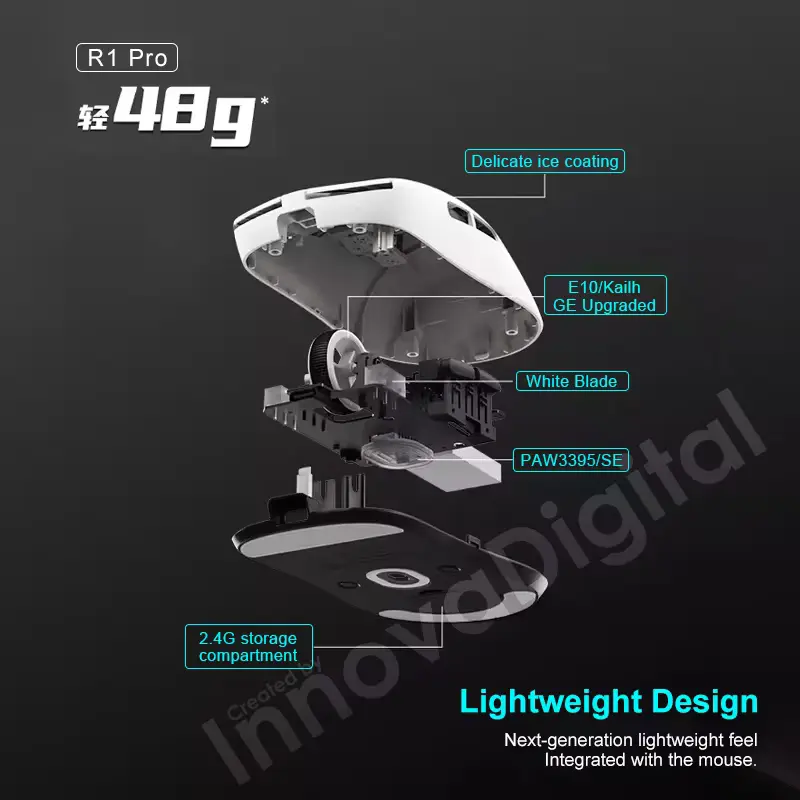
The R1 Pro is listed at approximately 48g, while the R1 Pro MAX is around 54g. The standard R1 sits around 51g.
That puts the mouse firmly into the lightweight gaming category.
A lighter mouse can be useful for games that require frequent repositioning, quick flicks, or large arm movements.
The R1 shell measures approximately 120.6 × 64 × 37.8mm across the family.
Its symmetrical shape also gives it a relatively straightforward design without a large thumb rest or pronounced right-handed ergonomic contour.
That can appeal to gamers who prefer a neutral shape.
However, shape remains highly personal.
A mouse that feels comfortable for one hand size or grip style may feel too small, too narrow, or differently balanced for another user.
PAW3395 Sensor and 26,000 DPI
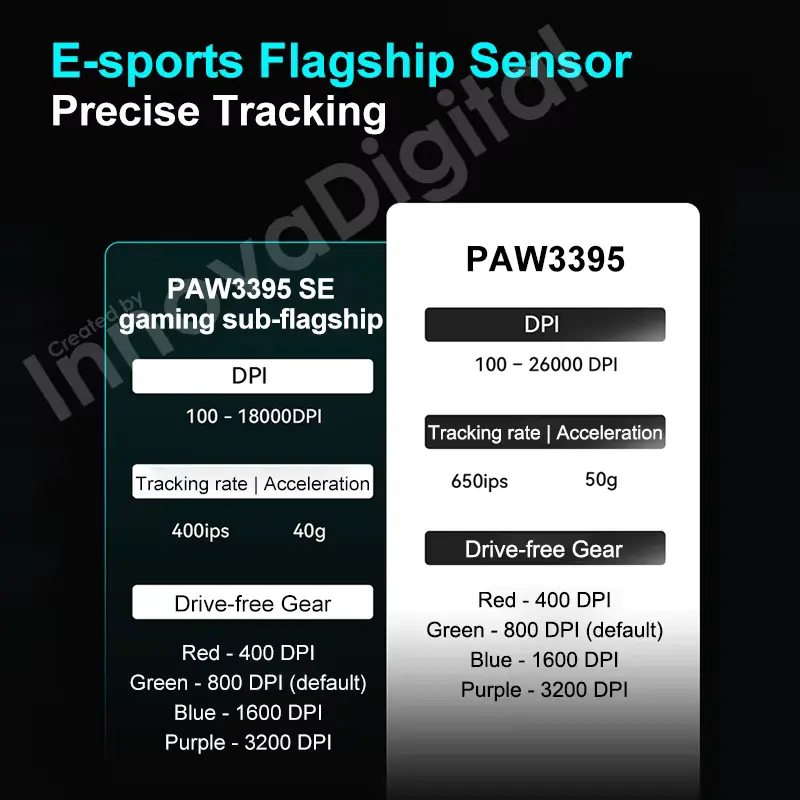
The PAW3395 is one of the most important pieces of hardware in the R1 Pro and Pro MAX.
The supplied listing specifically shows the R1 Pro MAX with:
- PAW3395 sensor
- 26,000 DPI
- 650 IPS
- 50G acceleration
Supporting documentation confirms those specifications for the Pro and Pro MAX models.
A maximum of 26,000 DPI is far beyond what most gamers will actually need.
That does not make the specification useless, but it is better viewed as a sign that the sensor provides a wide sensitivity range rather than something users should automatically set to its maximum.
Most gamers choose a much lower DPI and then adjust sensitivity inside individual games.
The advantage is flexibility.
650 IPS Tracking Speed
The R1 Pro MAX also lists a maximum tracking speed of 650 IPS.
IPS means inches per second and describes how quickly the sensor can track movement while maintaining its specified performance.
This specification is particularly relevant to fast mouse movements.
For ordinary desktop work, most users will never approach the sensor’s maximum tracking speed.
For fast FPS movements, however, a capable sensor gives the mouse plenty of tracking headroom.
The important distinction is that a high IPS rating does not automatically make someone a better player. It simply describes the sensor’s technical capability.
50G Acceleration
The R1 Pro MAX supports up to 50G acceleration according to the published specifications.
Again, this is a specification that matters more to the sensor’s capability than to everyday settings.
Competitive gamers may care about the consistency of tracking during rapid movements, but buyers should not choose a mouse based on the largest acceleration number alone.
Shape, weight, feet, switch feel, wireless stability, and personal grip can all influence the experience.
4K Polling Rate Support
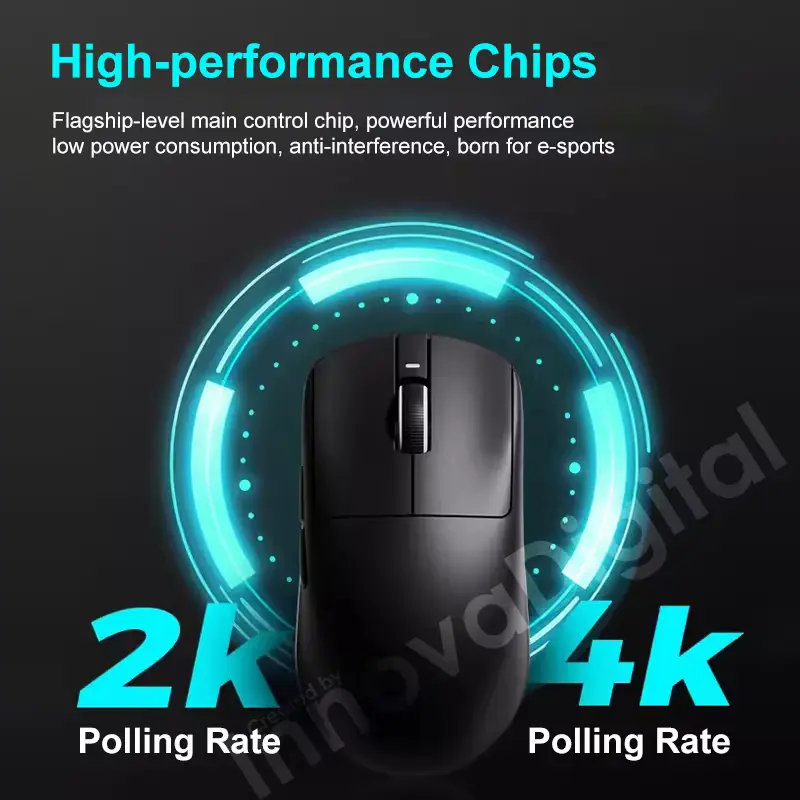
The R1 Pro MAX supports polling rates up to 4000Hz when paired with the appropriate receiver.
Polling rate describes how frequently the mouse reports its position to the computer.
At 1000Hz, the mouse reports its position 1,000 times per second. Higher polling rates can make cursor movement appear smoother and reduce the interval between reports.
However, higher polling rates also require more processing resources.
RTINGS notes that polling rates above 1000Hz can require considerable CPU resources, and not every game fully supports higher polling rates.
That makes the R1 Pro MAX’s 4K capability useful as an option rather than something every buyer needs to run continuously.
For many users, 1000Hz remains perfectly practical.
500mAh Battery and Long Runtime
The R1 Pro MAX stands out from the smaller-battery R1 variants with its 500mAh battery.
Supporting documentation lists approximately 150 hours of continuous use at 1000Hz for the Pro MAX.
That is a substantial figure for a lightweight wireless gaming mouse.
Battery life will naturally vary depending on settings and usage.
Higher polling rates can increase power consumption, while other software and wireless settings can also affect runtime.
Still, the combination of a 500mAh battery and lightweight body is one of the most attractive features of the Pro MAX.
Wireless and Wired Connectivity
The R1 Pro MAX supports 2.4GHz wireless and wired USB connectivity.
The 2.4GHz connection is the primary choice for wireless gaming, while the USB-C connection allows the mouse to operate as a wired device and recharge the battery.
The standard R1 and SE Plus variants have broader connectivity options in supporting documentation, including Bluetooth. The Pro and Pro MAX models focus on wired and 2.4GHz connectivity instead.
This distinction is important.
If Bluetooth connectivity is a requirement for your laptop, tablet, or secondary device, the Pro MAX may not be the right variant.
For dedicated gaming, however, the 2.4GHz connection is more relevant.
SmartSpeed X Wireless Technology
The R1 family uses VXE’s Smart Speed X Wireless technology.
The goal is to provide a low-latency wireless connection suitable for gaming while avoiding the cable drag associated with wired mice.
For competitive gaming, wireless reliability matters because intermittent signal problems can be much more disruptive than a small difference in specifications.
The R1 Pro MAX also supports a receiver extender, according to supporting documentation. Positioning the receiver closer to the mouse can help reduce potential wireless interference in demanding environments.
PTFE Feet for Smooth Movement
The R1 series uses PTFE mouse feet.
PTFE is widely used on gaming mice because it provides a smooth glide across compatible mouse pads.
The mouse’s low weight works together with the feet.
A lightweight body does not need as much force to move, while smooth feet can reduce resistance during larger movements.
The exact feel will still depend on the mouse pad.
A soft cloth pad and a hard pad can produce noticeably different levels of speed and control with the same mouse.
Main Switches and Click Feel
The higher-end R1 Pro and Pro MAX variants use Kailh White Blade switches according to supporting documentation.
Some documentation lists a rated lifespan of around 100 million clicks for the Pro MAX’s primary switches.
A click-life rating should not be treated as a guarantee that every individual switch will reach that number.
It is a manufacturer-rated durability figure under specified conditions.
The switch type also affects click feel.
Gamers who prefer crisp, light clicks may have different preferences from users who prefer a softer or heavier button press.
Since we have not physically tested the mouse, we cannot independently describe the exact click force or acoustic character.
VXE Hub Software
The R1 family can be configured through VXE/ATK software.
Supporting documentation identifies software functions for adjusting settings such as DPI, polling rate, button functions, and macros.
This is important because the mouse’s hardware specifications are only part of the experience.
Software allows users to configure the mouse around their preferred sensitivity and gaming setup.
Typical settings may include:
- DPI stages
- Polling rate
- Button assignments
- Macros
- Performance settings
- Firmware-related controls
Software support can change over time, so buyers should use the current official software version for their exact mouse.
R1 Pro MAX vs. R1 Pro
The two variants share the PAW3395 sensor and the same basic shell.
The main difference is the battery.
The R1 Pro uses a 250mAh battery and weighs around 48g, while the R1 Pro MAX uses a 500mAh battery and weighs around 54g. Supporting specifications list about 75 hours of battery life for the Pro and up to 150 hours for the Pro MAX at 1000Hz.
That creates a straightforward trade-off.
The Pro is lighter.
The Pro MAX provides substantially more battery capacity.
For FPS players who care strongly about minimum weight, the Pro may be more appealing.
For users who want longer wireless sessions between charges, the Pro MAX offers more battery capacity.
R1 vs. R1 Pro MAX
The standard R1 also uses the PAW3395 sensor, but it has a much smaller 250mAh battery and a listed weight of about 51g.
The R1 Pro MAX moves to a 500mAh battery and weighs approximately 54g.
Both use the PAW3395 platform, but the Pro MAX provides a much longer listed runtime.
The R1 can also offer Bluetooth according to supporting documentation, while the Pro MAX focuses on 2.4GHz and wired connections.
This makes the choice less about one mouse being universally better and more about which feature set matches your setup.
R1 SE Plus vs. R1 Pro MAX
The R1 SE Plus is another interesting alternative.
It uses the PAW3395 SE sensor rather than the standard PAW3395, with a listed maximum DPI of up to 18,000.
It also has a 500mAh battery and approximately 70 hours of battery life at 1000Hz according to supporting documentation.
The Pro MAX therefore offers the higher-end sensor platform and substantially longer listed runtime.
The SE Plus may still make sense for someone who wants a long-battery R1 shape without requiring the highest-end sensor configuration.
Customer Reviews and Buyer Feedback
The supplied AliExpress listing showed 4.9/5 from 187 reviews, with more than 1,000 total sales at the time of recording.
The visible customer response was largely positive.
Buyers frequently highlighted the lightweight feel, responsive movement, attractive shape, and overall quality.
Some users appeared to be comparing the R1 family with other lightweight gaming mice and were particularly interested in the balance between weight and performance.
The high rating is encouraging, but the review count still represents marketplace feedback rather than controlled laboratory testing.
Individual buyers may also receive different variants, colours, firmware versions, or production batches.
For that reason, the selected configuration matters.
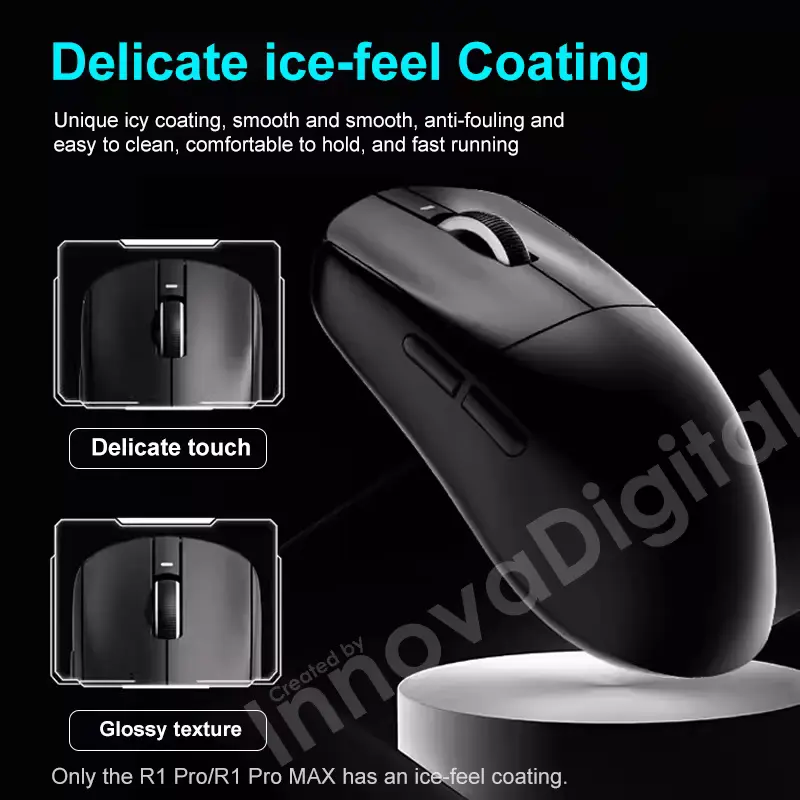
Is the VXE R1 Good for FPS Gaming?
The R1 family has several characteristics that make it relevant to FPS gaming.
The lightweight body can make repeated repositioning easier.
The PAW3395 sensor provides a high technical ceiling.
The 2.4GHz connection avoids the limitations of a cable during movement.
The Pro and Pro MAX models can also use higher polling rates with the appropriate receiver.
Shape remains the most personal factor.
A lightweight mouse only helps if its dimensions and curves suit your hand and preferred grip.
RTINGS similarly notes that gaming-mouse selection should consider hand size and grip style alongside polling rate and click latency.
Is the VXE R1 Good for Everyday PC Use?
The R1 can also work as a normal desktop mouse.
Its lightweight design makes it easy to move around a large desktop, while wireless connectivity keeps the desk free from cable clutter.
The high DPI range also gives users plenty of sensitivity options.
However, the symmetrical gaming shape may not provide the same ergonomic support as a larger office mouse with a pronounced palm rest.
If your main use is office work for many hours per day, comfort should take priority over gaming specifications.
VXE Dragonfly R1 Review for Competitive Gaming
The R1 Pro MAX’s hardware is clearly aimed at enthusiasts.
The combination of:
- PAW3395
- 26,000 DPI
- 650 IPS
- 50G
- 4K polling
- 500mAh battery
- 54g weight
- 2.4GHz wireless
Creates a specification set designed for performance-oriented users.
But specification numbers do not automatically translate into better gameplay.
A player’s sensitivity, grip, mouse pad, monitor, game settings, and personal muscle memory all affect the final experience.
The best approach is to use the mouse’s capabilities as tools rather than chasing the largest numbers.
VXE R1 and High Polling Rates
A 4K polling mode can sound impressive, but it is worth understanding what it changes.
At 1000Hz, the mouse reports every 1 millisecond.
At 4000Hz, that interval becomes 0.25 milliseconds.
The difference can contribute to smoother reporting, but the practical improvement becomes less obvious as polling rates rise.
RTINGS notes that differences between 1000Hz and much higher rates can be relatively subtle for many users and that higher rates can increase CPU usage.
Therefore, 4K polling is best viewed as an enthusiast feature.
You can use it if your PC and games benefit from it, but you do not need to run 4K simply because the mouse supports it.
Shape, Grip and Hand Size
The R1 family uses the same compact shell across its major variants.
Its dimensions are approximately 120.6 × 64 × 37.8mm.
The shape is symmetrical, although supporting documentation describes the mouse as right-hand oriented in some versions.
The relatively compact body can suit claw, fingertip, or hybrid grips depending on hand size and personal preference.
Palm-grip users with larger hands may want to compare the dimensions against their existing mouse before ordering.
Shape is one area where specifications cannot replace personal preference.
VXE Dragonfly R1 vs. GameSir Gaming Gear
If your setup includes multiple gaming peripherals, our GameSir Kaleid Flux Review 2026: Is It Worth Buying? covers a very different type of gaming accessory.
The GameSir Kaleid Flux is a wired Xbox/PC controller, while the VXE Dragonfly R1 is a lightweight PC gaming mouse.
The two products therefore serve different input roles.
The GameSir controller focuses on Hall Effect joysticks, vibration, RGB lighting, and controller-based gaming. The VXE focuses on precision mouse movement, low weight, high sensor specifications, and wireless gaming.
VXE Dragonfly R1 and Lenovo Smart Glasses
For another electronics product with a very different use case, see our Lenovo Smart Glasses Review 2026: Is It Worth Buying?
The Lenovo Smart Glasses focus on wearable features such as hands-free photography, AI assistance, translation, Bluetooth audio, and smart-display functionality.
The VXE Dragonfly R1 is much more focused on PC gaming and desktop control.
This comparison also highlights how different electronics products require different buying priorities. Gaming mice need attention to shape, sensor, weight, connectivity, and polling rate, while smart glasses require much more attention to cameras, audio, battery, display, and software features.
VXE Dragonfly R1 Review: Pros and Cons
Pros
- Lightweight gaming-mouse design.
- R1 Pro MAX weighs approximately 54g.
- PAW3395 sensor in R1, Pro, and Pro MAX variants.
- Up to 26,000 DPI on PAW3395 models.
- Up to 650 IPS tracking speed.
- Up to 50G acceleration.
- 500mAh battery on R1 Pro MAX.
- Up to 150 hours of listed battery life at 1000Hz.
- 2.4GHz wireless connectivity.
- USB wired operation.
- Up to 4000Hz polling with the appropriate receiver.
- PTFE mouse feet.
- Compact symmetrical shell.
- VXE/ATK software customization.
- Several variants allow buyers to choose different sensor and battery combinations.
- Strong customer rating on the supplied listing.
- Suitable for FPS and other fast-paced PC games.
Cons
- Variant names can make the lineup confusing.
- R1 Pro MAX is heavier than the R1 Pro.
- Bluetooth is not listed for the Pro and Pro MAX models.
- 4K polling requires the appropriate receiver.
- Higher polling rates can increase CPU usage.
- 26,000 DPI is far beyond what most gamers need.
- Shape may not suit every hand size or grip.
- Marketplace specifications can vary between versions.
- Long-term durability has not been independently tested.
- We have not personally measured click latency or sensor latency.
Who Should Consider the VXE Dragonfly R1 Review?
The R1 family may suit you if you want a lightweight gaming mouse with multiple configurations.
- Play competitive PC games.
- Prefer lightweight gaming mice.
- Play FPS titles.
- Want a wireless mouse without a large ergonomic shell.
- Want a PAW3395 sensor.
- Want a high DPI range.
- Prefer 2.4GHz wireless gaming.
- Want long battery life.
- Like configuring DPI and polling rate.
- Want the option of higher polling rates.
- Prefer a compact symmetrical mouse shape.
For longer battery life, the R1 Pro MAX stands out with its larger battery.
Users who prioritise lower weight may prefer the R1 Pro, which is lighter than the Pro MAX.
Who May Want a Different Mouse?
A different mouse may fit better if:
- You prefer a large ergonomic palm-rest design.
- You need Bluetooth connectivity.
- You strongly prefer a heavier mouse.
- You want many side buttons for MMO gaming.
- You need RGB lighting.
- You prefer a vertical ergonomic mouse for office work.
- You do not want to manage gaming software.
- You have very large hands and prefer a larger shell.
The R1 is designed around a relatively simple, lightweight gaming shape, so its strengths may not match every user.
Buying Guide: Which R1 Variant Should You Choose?
Choose R1 SE Plus if:
You want the R1 shape, a large battery, Bluetooth, and a more affordable sensor configuration.
Choose R1 if:
You want the PAW3395 sensor and a relatively light 51g design while keeping Bluetooth available.
Choose R1 Pro if:
You want the PAW3395 sensor, approximately 48g weight, and up to 75 hours of listed battery life at 1000Hz.
Choose R1 Pro MAX if:
You want the PAW3395 sensor, 500mAh battery, approximately 54g weight, and the longest listed battery life in the core R1 lineup.
Before ordering, confirm whether the listing includes the receiver needed for your desired polling rate.
What to Check Before Buying
Before placing an order, check these details carefully:
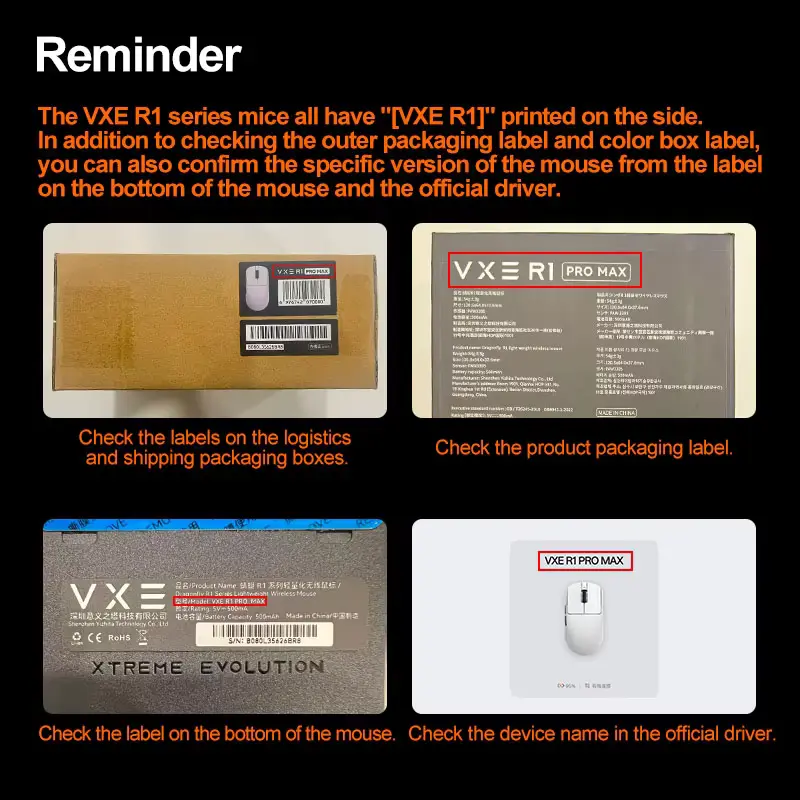
1. Exact variant: R1 SE Plus, R1, R1 Pro, or R1 Pro MAX.
2. Sensor: Confirm whether the listing uses PAW3395 or PAW3395 SE.
3. Battery: Battery capacity varies significantly between versions.
4. Weight: The Pro is lighter than the Pro MAX.
5. Connectivity: Confirm whether Bluetooth is available on your selected model.
6. Receiver: Check whether a 2K/4K receiver is included if you want higher polling rates.
7. Colour: The listing shows multiple colour choices.
8. Software: Confirm the current VXE/ATK software support for your operating system.
9. Hand size: Compare the 120.6 × 64 × 37.8mm dimensions with your current mouse.
10. Seller: Check the seller’s current feedback, return policy, and exact product description.
Review Methodology: What We Considered
This VXE Dragonfly R1 Review is based on the supplied AliExpress listing, visible product specifications, variant information, customer feedback, supporting product documentation, comparison research, and practical buying considerations.
We considered:
- PAW3395 and PAW3395 SE sensor options
- 26,000 DPI maximum
- 650 IPS tracking
- 50G acceleration
- Battery capacities
- Listed battery life
- 2.4GHz wireless connectivity
- Wired USB connectivity
- Bluetooth availability on selected variants
- 4K polling capability
- Mouse dimensions
- Weight
- PTFE feet
- Main switch specifications
- Software support
- Customer feedback
- Variant differences
- FPS gaming suitability
- Everyday PC use
- Practical buying considerations
We have not personally conducted hands-on testing of the VXE Dragonfly R1.
Therefore, we do not claim to have independently measured:
- Click latency
- Sensor latency
- Actual battery runtime
- Wireless interference resistance
- Switch force
- Scroll-wheel durability
- Long-term coating durability
- Actual 4K polling performance
- Long-term component reliability
The technical specifications in this review come from published product information and supporting documentation. Customer reviews represent individual experiences rather than guaranteed results.
Final Verdict: Is the VXE Dragonfly R1 Review Worth Buying?
The VXE Dragonfly R1 Review family is an interesting option for PC gamers who want a lightweight mouse with modern sensor hardware and wireless connectivity.
The lineup’s biggest advantage is choice.
The standard R1, R1 SE Plus, R1 Pro, and R1 Pro MAX share the same general shell but differ in key internal specifications.
The R1 Pro MAX stands out with its PAW3395 sensor, 26,000 DPI maximum, 650 IPS tracking, 50G acceleration, 500mAh battery, approximately 54g weight, and up to 4000Hz polling with the appropriate receiver. Supporting documentation lists up to 150 hours of battery life at 1000Hz.
The R1 Pro takes a different approach by reducing the weight to around 48g while using a smaller 250mAh battery.
That makes the Pro and Pro MAX useful examples of the main trade-off within this family: lower weight versus longer battery capacity.
The standard R1 and SE Plus variants also give buyers alternatives if Bluetooth or different battery configurations matter more.
The supplied AliExpress listing’s 4.9/5 rating from 187 reviews and 1,000+ sales provides encouraging marketplace feedback. Buyers generally praise the mouse’s lightweight design, responsiveness, shape, and overall experience.
Still, the rating does not replace controlled testing.
We have not personally tested the mouse, so we cannot independently confirm its actual click latency, sensor performance, battery runtime, or long-term durability.
Overall Rating: ⭐⭐⭐⭐☆ 4.6/5
For gamers who want a lightweight wireless mouse with a PAW3395 sensor, high DPI capability, long battery options, and enthusiast-level polling support, the VXE Dragonfly R1 family offers a well-equipped platform.
The most important step before buying is to select the correct R1 variant rather than treating every R1 model as identical.
👉 Check the current VXE Dragonfly R1 listing and selected variant before purchase.