
Affiliate Disclosure: This article contains affiliate links. If you purchase through a qualifying link, we may earn a commission at no additional cost to you. This review is based on published product specifications, the supplied product listing, available product information, visible customer feedback, comparison research, and practical buying considerations. We have not personally conducted hands-on testing of the AULA F87 Pro V2.
Quick Verdict: Is the AULA F87 Pro V2 Worth Buying?
The AULA F87 Pro V2 is an 87-key TKL mechanical keyboard aimed at gamers, mechanical-keyboard enthusiasts, and everyday PC users who want a compact layout without giving up the function row and navigation keys.
Its main attractions include tri-mode connectivity, hot-swappable mechanical switches, a gasket-mounted structure, RGB lighting, a large rechargeable battery, and an advertised high polling rate. AULA’s published specifications list Bluetooth, 2.4GHz wireless, and USB-C wired connections, along with an 87-key layout and 10,000mAh battery.
The supplied AliExpress listing also shows multiple colors and switch configurations, including a Strawberry Mint option and a 12,000mAh configuration shown in one product image. Because marketplace variants can differ, buyers should check the exact configuration before ordering.
Our Rating: ⭐⭐⭐⭐½ 4.5/5
Best for: PC gamers, mechanical-keyboard enthusiasts, wireless desktop setups, and users who want a customizable TKL keyboard.
Bottom line: The AULA F87 Pro V2 combines a practical 87-key layout with enthusiast-focused features. Its hot-swap design, gasket structure, tri-mode connectivity, RGB lighting, and large battery make it more versatile than a basic gaming keyboard. The main things to check are the exact switch, battery, polling rate, color, and feature configuration offered by the seller.
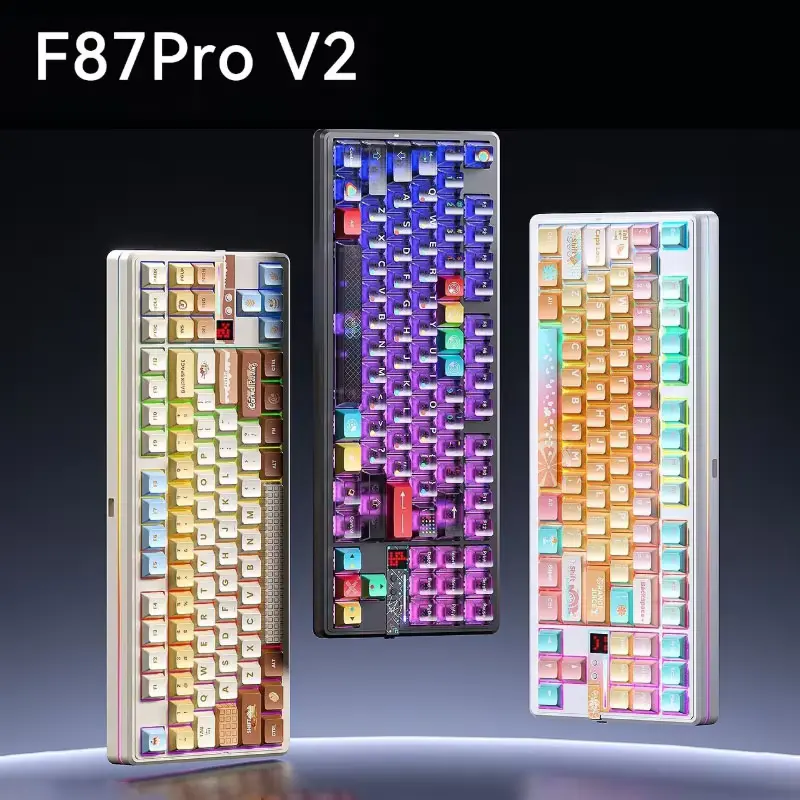
AULA F87 Pro V2 Specifications
| Feature | Details |
|---|---|
| Brand | AULA |
| Model | F87 Pro V2 |
| Keyboard Type | Mechanical |
| Layout | TKL |
| Number of Keys | 87 |
| Connectivity | USB-C, 2.4GHz wireless, Bluetooth |
| Polling Rate | Up to 8,000Hz depending on configuration/mode |
| Mounting Structure | Gasket-mounted |
| Switches | Mechanical, variant-dependent |
| Hot-Swappable | Yes |
| Backlighting | RGB |
| Battery | Up to 10,000mAh on published configuration; some marketplace variants show different capacities |
| Dimensions | Approx. 362 × 138 × 42mm |
| Weight | About 1.09kg |
| Compatibility | Windows, macOS, iOS, Android |
| Charging | USB-C |
| Keyboard Language Shown | English |
| Origin | Mainland China |
| Hands-On Testing | Not conducted |
AULA’s published F87 Pro V2 specifications list 87 keys, a TKL layout, tri-mode connectivity, gasket mounting, hot-swap support, RGB lighting, and a 10,000mAh rechargeable battery.
What Is the AULA F87 Pro V2?
The AULA F87 Pro V2 is a wireless mechanical keyboard designed around the TKL or tenkeyless layout.
A TKL keyboard removes the dedicated number pad found on a full-size keyboard. In return, it creates a narrower footprint while retaining the function row, arrow keys, and many navigation keys.
That makes this format popular among PC gamers who want more desk space for their mouse without moving to a 60% keyboard.
The F87 Pro V2 takes that basic layout and adds several enthusiast-oriented features.
These include:
- Mechanical switches
- Hot-swappable switch sockets
- Gasket-mounted construction
- RGB lighting
- Tri-mode connectivity
- Rechargeable battery
- High polling-rate support
- Programmable/customizable features
- Multiple switch choices
- Multiple color configurations
The supplied listing describes the keyboard as a wireless triple-mode mechanical keyboard with Bluetooth, RGB backlighting, and gaming-focused features.
AULA F87 Pro V2 Design and TKL Layout
The 87-key TKL layout is one of the keyboard’s most practical features.
A full-size keyboard takes up considerable horizontal desk space because of the number pad. The F87 Pro V2 removes that section while keeping the main typing area intact.
This creates more room between the keyboard and mouse.
That can benefit FPS players who use lower mouse sensitivity and need more space for wider mouse movements.
The TKL format also remains practical for everyday work.
You still get:
- Function keys
- Arrow keys
- Navigation controls
- Main alphanumeric keys
- Standard modifier keys
As a result, you do not need to rely on multiple Fn-layer combinations for basic navigation tasks.
AULA lists the keyboard at approximately 362 × 138 × 42mm and about 1.09kg.
That makes it a substantial desktop keyboard rather than an ultra-light travel board.
AULA F87 Pro V2 Build and Gasket Structure
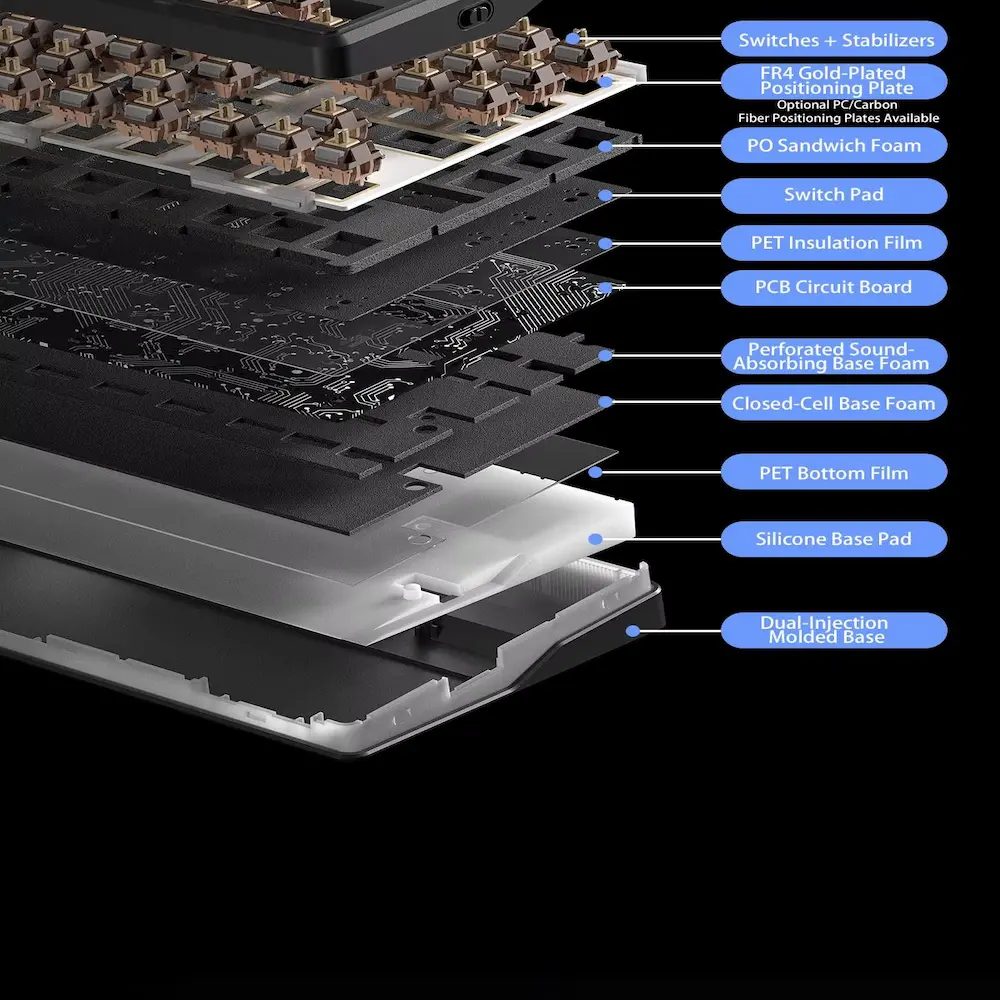
The F87 Pro V2 uses a gasket-mounted structure.
Gasket mounting has become popular in enthusiast mechanical keyboards because it can provide a softer and more flexible typing feel than a rigid mounting design.
Instead of attaching the plate in a completely rigid way, the structure uses flexible mounting material to provide some separation between the keyboard components.
The final typing experience depends on several factors, though.
These include:
- Switch type
- Keycaps
- Plate material
- Internal dampening
- Stabilizers
- Case construction
- Mounting design
Therefore, the gasket structure should not be treated as a guarantee of one specific sound or typing feel.
Instead, it is one part of the overall keyboard design.
The F87 Pro V2 is clearly aimed at users who care about mechanical-keyboard construction rather than simply wanting a basic wireless keyboard.
AULA F87 Pro V2 Mechanical Switches
Switch selection can make a significant difference to the way a mechanical keyboard feels.
The supplied listing shows several switch configurations, while AULA’s product page lists options including StarArrow, Strawberry Mint, X3, Meteor Ice Cream, and Greywood V4.
These options allow buyers to choose a keyboard that better matches their preferred typing style.
Linear switches generally provide a smooth keypress without a pronounced tactile bump.
Tactile switches provide a noticeable change in resistance during the keypress.
Clicky switches add an audible click mechanism.
The exact switch available depends on the selected F87 Pro V2 configuration.
This is important because two keyboards with the same model name can feel different if they use different switches.
For gaming, many users prefer smooth linear switches because the consistent movement can feel predictable during repeated key presses.
For typing, the choice becomes more personal.
Some users prefer a smooth linear action, while others prefer tactile feedback that makes each keypress more noticeable.
Hot-Swappable Switches and Customization
One of the most useful enthusiast features is the keyboard’s hot-swap capability.
A hot-swappable keyboard allows compatible mechanical switches to be removed and replaced without soldering. RTINGS explains that this design makes switch experimentation and replacement considerably easier than traditional soldered keyboards.
That gives the AULA F87 Pro V2 a useful upgrade path.
For example, you could start with the factory switches and later experiment with another compatible linear or tactile switch.
You can also replace an individual faulty switch without necessarily replacing the entire keyboard.
However, buyers should still check compatibility before purchasing replacement switches.
Not every mechanical switch uses the same mounting configuration, and some switch types require additional compatibility checks.
For anyone entering the mechanical-keyboard hobby, this feature can make the F87 Pro V2 more interesting than a conventional prebuilt keyboard.
AULA F87 Pro V2 RGB Lighting
RGB lighting is another major part of the keyboard’s gaming-oriented design.
The supplied product images show colorful RGB effects across the keyboard, while AULA lists RGB lighting as part of the F87 Pro V2 specification.
RGB lighting can serve several purposes.
For gaming setups, the keyboard can match the rest of the desktop accessories.
During night use, adjustable lighting can improve visibility without adding unnecessary brightness.
Those who prefer a clean office appearance can reduce the lighting or switch it off, depending on the configuration.
Some F87 Pro V2 versions also include additional matrix or ambient lighting features.
The supplied listing shows several visually different keyboard configurations, so buyers should check whether their selected variant includes the exact lighting features shown in the product images.
AULA F87 Pro V2 Polling Rate
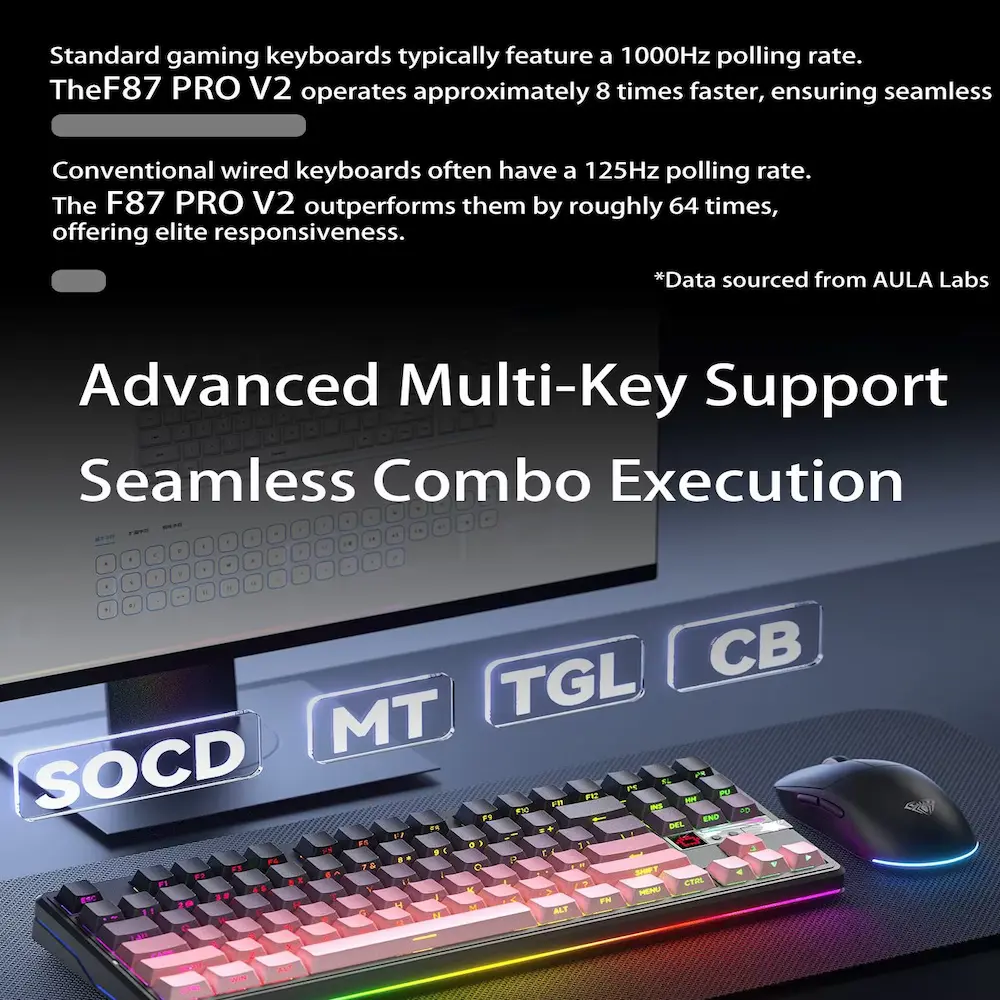
One of the more eye-catching specifications is the advertised 8,000Hz polling rate.
Polling rate refers to how frequently a device reports input information to the computer.
A higher polling rate can reduce the interval between reports.
However, the maximum number should not automatically become the deciding factor when choosing a keyboard.
The actual benefit depends on the connection mode, computer, game, software, display refresh rate, and overall system configuration.
More importantly, the F87 Pro V2’s maximum polling rate can depend on the specific configuration and connection mode.
The published manual information identifies 8,000Hz for wired operation, while 2.4GHz and Bluetooth modes can use lower polling rates depending on the version.
That makes the distinction important for buyers.
If you want the highest advertised polling rate, check the exact connection mode required by your selected variant.
Tri-Mode Connectivity
The AULA F87 Pro V2 supports three main connection methods:
USB-C Wired
The wired USB-C connection is the straightforward option for a desktop gaming setup.
It avoids wireless pairing and provides a direct connection between the keyboard and computer.
It is also useful when charging the keyboard.
2.4GHz Wireless
The 2.4GHz wireless mode provides a dedicated wireless connection through the included receiver.
This mode makes more sense for gaming when you want to remove the cable without depending on Bluetooth.
The exact polling rate can differ from the maximum wired specification, so competitive users should check their specific model documentation.
Bluetooth
Bluetooth provides the greatest flexibility for compatible laptops, tablets, phones, and computers.
AULA lists Windows, macOS, iOS, and Android compatibility for the F87 Pro V2.
That makes the keyboard useful beyond a single gaming PC.
You could potentially use it with a desktop during gaming and switch to another device for general typing.
AULA F87 Pro V2 Battery
Battery capacity is another major feature.
AULA’s current product page lists a 10,000mAh rechargeable battery for the F87 Pro V2.
The supplied marketplace video also shows configurations advertising both 10,000mAh and 12,000mAh capacities.
Because the listing contains multiple configurations, buyers should check the exact battery capacity attached to their selected variant.
Actual battery life will also depend on usage.
Important factors include:
- RGB brightness
- RGB effects
- Wireless mode
- Polling rate
- Typing frequency
- Sleep settings
- Firmware
- Battery condition
Therefore, a large battery capacity does not automatically translate into one fixed number of operating hours.
For a wireless mechanical keyboard, however, a large rechargeable battery can reduce how frequently you need to connect the charging cable.
AULA F87 Pro V2 Software and Customization
The F87 Pro V2 also supports keyboard customization through AULA’s software ecosystem.
Depending on the configuration, users can customize functions such as:
- RGB lighting
- Key assignments
- Lighting effects
- Matrix display functions
- Other programmable settings
The keyboard manual also documents Fn shortcuts for lighting, system modes, Bluetooth connections, battery information, and other functions.
This makes the F87 Pro V2 more flexible than a simple plug-and-play office keyboard.
At the same time, buyers should download the driver or configuration software intended specifically for the F87 Pro V2 version they purchase.
Different AULA keyboard generations can use different software.
AULA F87 Pro V2 for PC Gaming
The F87 Pro V2 has several features that fit naturally into a gaming setup.
The TKL layout saves desk space.
Mechanical switches provide a different feel from membrane keyboards.
The gasket structure targets a softer typing experience.
RGB lighting adds gaming-focused aesthetics.
Tri-mode connectivity gives users wired and wireless options.
Hot-swap capability provides a path for future customization.
The high polling-rate specification also targets gamers who care about input responsiveness.
However, not every gamer needs every one of these features.
For casual gaming, the layout, switch feel, wireless convenience, and comfort may matter more than 8K polling.
For competitive players, connection mode and actual latency become more important.
Because we have not performed hands-on latency testing, we cannot claim a particular real-world response time.
AULA F87 Pro V2 for Typing and Office Work
The keyboard can also work as a general-purpose desktop keyboard.
The TKL layout retains the keys most users need for writing, browsing, programming, and everyday office work.
The wireless modes can reduce cable clutter.
The mechanical switches can also appeal to users who prefer a more distinct typing experience.
The main limitation for office work is the missing number pad.
If you regularly work with spreadsheets, accounting software, or numerical data entry, a full-size keyboard may remain more practical.
For writing, programming, browsing, and mixed gaming use, however, TKL provides a useful middle ground.
AULA F87 Pro V2 Customer Reviews
The supplied AliExpress listing showed a 5.0/5 rating from 1 review and 5 sales for the selected configuration at the time of recording.
That is a very small sample, so it cannot establish long-term reliability or broad customer satisfaction.
The visible verified buyer selected the Brown color and wrote that the keyboard’s sound was nice and the design was good.
That feedback is useful as an individual impression, but it should not be treated as proof that every switch configuration sounds the same.
Switch type, keycaps, case construction, desk surface, and personal preference can all affect perceived keyboard sound.
Because the listing has only one visible review for the selected configuration, buyers should focus heavily on the specifications and exact variant rather than relying on the rating alone.


What Comes in the Box?
AULA’s published product information lists the following items:
- AULA F87 Pro V2 keyboard
- Keycap puller
- User manual
- USB-C cable
The exact contents can vary by marketplace bundle, so buyers should check the selected listing before ordering.
A keycap puller is particularly useful if you want to customize the keyboard later.
AULA F87 Pro V2 Colors and Switch Variants
The supplied AliExpress listing shows several color options.
Visible configurations include variations such as:
- Brown
- Khaki
- Maroon
- Natural Factors
- Navy Blue
- Olive
- Pewter
- Gold
- Pink
- Grey
- Other themed colorways
The listing also shows different switch options, including configurations labelled:
- Feather Switch
- Strawberry Mint Switch
- Other mechanical switch variants
AULA’s published product page provides additional switch choices, including StarArrow, Strawberry Mint, X3, Meteor Ice Cream, and Greywood V4.
This is why buyers should not select a color based only on the keyboard’s appearance.
The exact switch should also appear beside the selected variant.
AULA F87 Pro V2 vs R36S Retro Handheld
The R36S Retro Handheld and AULA F87 Pro V2 are very different products, but both can fit into a broader gaming setup.
Our R36S review covers a portable Linux-based retro gaming device with a built-in screen and controls.
| Feature | AULA F87 Pro V2 | R36S |
|---|---|---|
| Product Type | Mechanical keyboard | Retro handheld |
| Main Use | PC gaming and typing | Portable retro gaming |
| Layout | 87-key TKL | Built-in controls |
| Display | None | Built-in IPS display |
| Mechanical Switches | Yes | No |
| Wireless | Bluetooth / 2.4GHz | Configuration-dependent |
| Battery | Rechargeable | Rechargeable |
| RGB | Yes | Not the main focus |
| Portability | Moderate | High |
| Main Advantage | Desktop input | Portable gaming |
These products do not directly compete.
Instead, they can complement different parts of a gaming setup.
AULA F87 Pro V2 vs Honeycomb Wireless Gaming Mouse
A keyboard and mouse naturally work together on a PC gaming desk.
Our Honeycomb Wireless Gaming Mouse Review 2026: Is It Worth Buying? covers a wireless honeycomb-style mouse with 2.4GHz connectivity, rechargeable Type-C charging, adjustable DPI, and RGB lighting.
| Feature | AULA F87 Pro V2 | Honeycomb Wireless Gaming Mouse |
|---|---|---|
| Product Type | Mechanical keyboard | Gaming mouse |
| Primary Input | Keys | Cursor/aiming |
| Wireless | Bluetooth / 2.4GHz | 2.4GHz |
| Wired Mode | USB-C | USB-C |
| RGB | Yes | Yes |
| Rechargeable | Yes | Yes |
| Main Advantage | Keyboard control | Mouse control |
| Best For | Gaming + typing | Gaming + navigation |
For someone building a complete PC gaming setup, the two accessories serve complementary roles.
Pros and Cons of the AULA F87 Pro V2
Pros
- 87-key TKL layout
- Compact footprint
- Mechanical switches
- Hot-swappable design
- Gasket-mounted structure
- Tri-mode connectivity
- USB-C wired connection
- 2.4GHz wireless
- Bluetooth
- RGB lighting
- Large rechargeable battery
- High advertised polling rate
- Multiple switch options
- Multiple color options
- Suitable for gaming and typing
- Windows, macOS, iOS, and Android compatibility
- Customization features
- USB-C charging
- Includes keycap puller
Cons
- No dedicated number pad
- Exact specifications can vary by configuration
- Maximum polling rate depends on connection/mode and variant
- One visible marketplace review provides very limited customer-feedback data
- Relatively heavy compared with compact travel keyboards
- Buyers need to check switch compatibility before customization
- RGB and advanced features may increase power consumption
- No hands-on testing was conducted for this review
Who Should Buy the AULA F87 Pro V2?
The AULA F87 Pro V2 could suit you if you:
- Want an 87-key TKL mechanical keyboard.
- Need more mouse space than a full-size keyboard provides.
- Prefer mechanical switches.
- Want to experiment with different switches.
- Like RGB gaming setups.
- Need wired and wireless connection options.
- Use multiple devices.
- Want a large rechargeable battery.
- Play PC games regularly.
- Want one keyboard for gaming and work.
- Prefer a larger layout than a 60% keyboard.
- Like customizing your mechanical keyboard.
The combination of TKL layout and customization makes the keyboard suitable for a wide range of desktop setups.
Who Should Skip the AULA F87 Pro V2?
You may want another keyboard if you:
- Need a dedicated number pad.
- Prefer a very small 60% keyboard.
- Want an ultra-light travel keyboard.
- Prefer membrane or laptop-style keys.
- Do not care about mechanical customization.
- Want dedicated macro keys.
- Want Hall Effect switches and adjustable actuation.
- Need a keyboard with identical specifications across every marketplace variant.
- Prefer a simple keyboard with minimal software features.
The F87 Pro V2 focuses on conventional mechanical-switch customization rather than Hall Effect magnetic switching.
How to Choose the Right AULA F87 Pro V2
Before buying, check these points carefully.
1. Check the Layout
Make sure the 87-key TKL layout provides all the keys you need.
2. Choose the Switch
The switch has a major effect on sound and typing feel.
If you prefer smooth movement, consider a linear option. If you want more tactile feedback, look for an appropriate tactile configuration.
3. Check the Battery
The published AULA configuration uses a 10,000mAh battery, while the supplied marketplace video shows a 12,000mAh configuration as well.
Confirm the battery capacity for the exact variant you select.
4. Confirm the Polling Rate
If 8K polling matters to you, verify which connection mode supports the advertised rate.
5. Check Connectivity
Make sure your chosen version supports the wired, 2.4GHz, and Bluetooth modes you need.
6. Select the Color
The listing offers numerous colorways.
Check the selected option carefully because the switch configuration may change between variants.
7. Check the Accessories
Confirm that the package contains the USB-C cable, keycap puller, and manual if those items matter to you.
8. Check the Seller
Marketplace sellers can offer different revisions under similar product names.
Always compare the seller’s specification table with the exact variant you intend to purchase.
How to Set Up the AULA F87 Pro V2
The basic setup should be straightforward.
USB-C Wired Setup
Connect the supplied USB-C cable to the keyboard and computer.
The keyboard should work as a standard input device once the operating system detects it.
2.4GHz Wireless Setup
Switch the keyboard to 2.4GHz mode and connect the supplied wireless receiver.
The exact pairing shortcut can vary by model, so follow the manual supplied with your keyboard.
Bluetooth Setup
Switch to Bluetooth mode and use the appropriate Fn shortcut to enter pairing mode.
The F87 Pro V2 manual documents multiple Bluetooth channels, allowing compatible devices to remain paired for easier switching.
Customize the Keyboard
After basic setup, install or access the appropriate AULA driver if your configuration supports software customization.
You can then adjust available lighting effects, key functions, and other supported settings.
AULA F87 Pro V2 Battery and Charging Tips
The F87 Pro V2 uses a rechargeable battery and USB-C charging.
For regular use, the simplest approach is to connect the keyboard through USB-C when the battery becomes low.
The manual also warns users to use standard computer USB ports for charging rather than unsuitable fast-charging adapters.
RGB lighting can consume more power than using the keyboard with the lights off.
If maximum wireless runtime matters more than appearance, reducing RGB brightness or turning the lighting off can help reduce power consumption.
Because we have not personally measured battery endurance, we do not provide a specific runtime claim.
Is the AULA F87 Pro V2 8K Polling Rate Important?
The 8K polling specification is one of the keyboard’s most attention-grabbing features, but it should not be the only reason to buy it.
Higher polling rates can reduce the interval between input reports.
However, the practical effect depends on the entire system.
Your:
- Computer
- Game
- Display
- Connection method
- USB configuration
- Software
- Keyboard firmware
can all influence the final input experience.
The F87 Pro V2 documentation also shows that different connection modes can use different polling rates.
Therefore, competitive gamers should pay attention to the exact connection mode required for the highest polling specification.
For ordinary gaming and office work, the keyboard’s layout, switch feel, wireless flexibility, and customization may matter more.
Review Methodology
This AULA F87 Pro V2 Review is based on the supplied AliExpress product-listing video, visible product specifications, product images, visible customer feedback, AULA’s published specifications, available technical documentation, comparison research, and practical buying considerations.
We reviewed:
- 87-key TKL layout
- Mechanical switches
- Gasket-mounted structure
- Hot-swap capability
- RGB lighting
- Tri-mode connectivity
- 2.4GHz wireless
- Bluetooth
- USB-C wired mode
- Polling-rate specifications
- Battery configurations
- Software and customization
- Color variants
- Switch variants
- Customer feedback
- Gaming use
- Office and typing use
- Compatibility considerations
We have not personally conducted hands-on testing of this keyboard.
Therefore, we do not claim to have independently measured:
- Input latency
- Battery endurance
- Switch durability
- Wireless range
- Typing noise
- RGB brightness
- Long-term reliability
- Actual polling performance
- Wireless stability
- Switch feel
Those characteristics can also vary according to the selected configuration.
Final Verdict: AULA F87 Pro V2 Review 2026
The AULA F87 Pro V2 is a feature-rich TKL mechanical keyboard designed for users who want more than a basic wireless board.
Its 87-key layout provides a useful middle ground between a full-size keyboard and a compact 60% model.
For gaming, the narrower footprint leaves more room for mouse movement.
For everyday work, the retained function row and navigation keys make the keyboard more practical than many smaller layouts.
The hot-swappable switch design is another major advantage for mechanical keyboard enthusiasts. It allows compatible switches to be changed without soldering, making future customization easier.
The gasket-mounted structure, RGB lighting, tri-mode connectivity, rechargeable battery, and high polling-rate options add further flexibility.
However, buyers should pay attention to the exact variant.
The supplied marketplace listing shows different colors, switches, and battery configurations. The maximum polling specification can also depend on the connection mode.
The visible marketplace feedback is also limited, with only one review shown for the selected configuration at the time of recording. That means the 5.0/5 rating should not be treated as proof of long-term reliability.
Final Rating: ⭐⭐⭐⭐½ 4.5/5
Our Verdict: The AULA F87 Pro V2 offers a strong combination of TKL design, mechanical switches, hot-swap customization, gasket mounting, RGB lighting, wireless connectivity, and a large rechargeable battery. It can suit both gaming and everyday desktop use, especially for users who want a customizable keyboard without moving to an extremely compact layout.
Its biggest buying consideration is not simply the model name. Check the exact switch, color, battery capacity, connectivity options, and polling-rate specification attached to your selected variant.
Final Buying Tip
If you want a customizable TKL mechanical keyboard that can handle gaming, typing, and multiple devices, the AULA F87 Pro V2 is worth considering.
Check the current listing, exact variant, switch, connectivity, and included accessories before buying.