
Affiliate Disclosure: This article contains affiliate links. If you purchase through a qualifying link, we may earn a commission at no additional cost to you. This review is based on published product specifications, available product information, visible customer feedback, comparison research, and practical buying considerations. We have not personally conducted hands-on testing of the Creality Space Pi Review Filament Dryer.
Quick Verdict: Creality Space Pi Review
The Creality Space Pi Review covers a compact filament dryer designed to remove moisture from 3D printing filament before or during printing. It uses adjustable heating from 45°C to 70°C, 360° hot-air circulation, real-time temperature and humidity monitoring, and drying-time settings up to 48 hours.
The supplied AliExpress listing shows the Space Pi as a single-spool filament dryer with US and EU plug configurations. The listing also highlights compatibility with common 3D printer filaments and features a compact desktop design.
At the time of the supplied recording, the marketplace listing showed 4.7/5 from 99 reviews, 1,000+ sales, and 800+ cross-platform sales. Visible customer feedback included comments about effective filament drying, reduced stringing, good packaging, straightforward operation, and acceptable noise levels.
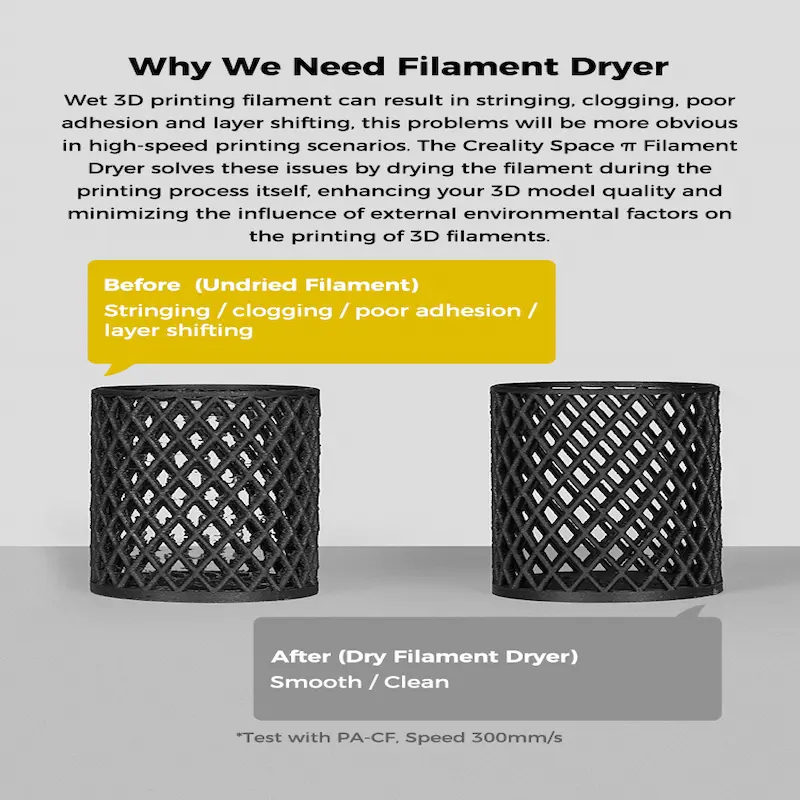
The main purpose of a filament dryer is simple: moisture can negatively affect printing performance, especially with more hygroscopic materials. Prusa notes that many FFF printing materials absorb moisture from the environment and that wet filament can contribute to problems such as stringing, poor layer adhesion, bubbling, and other print-quality issues.
The Space Pi does not replace the need to follow the filament manufacturer’s recommended drying temperature. Instead, it provides a controlled heating environment within its 45–70°C range.
Our Rating: 4.6/5 ⭐⭐⭐⭐⭐
For 3D printing users who regularly work with moisture-sensitive filament, the Space Pi offers a practical single-spool drying solution. Its biggest limitations are the one-spool capacity and maximum 70°C temperature, which may not suit some higher-temperature engineering materials.
Creality Space Pi Review: Specifications
| Feature | Details |
|---|---|
| Brand | Creality |
| Product | Space Pi Filament Dryer |
| Product Type | Filament drying box |
| Spool Capacity | 1 spool |
| Temperature Range | 45–70°C |
| Drying Time | 1–48 hours |
| Heating | 360° PTC hot-air heating |
| Power | 145W |
| Humidity Monitoring | Yes |
| Temperature Monitoring | Yes |
| Filament Presets | One-key settings for 12 filament types |
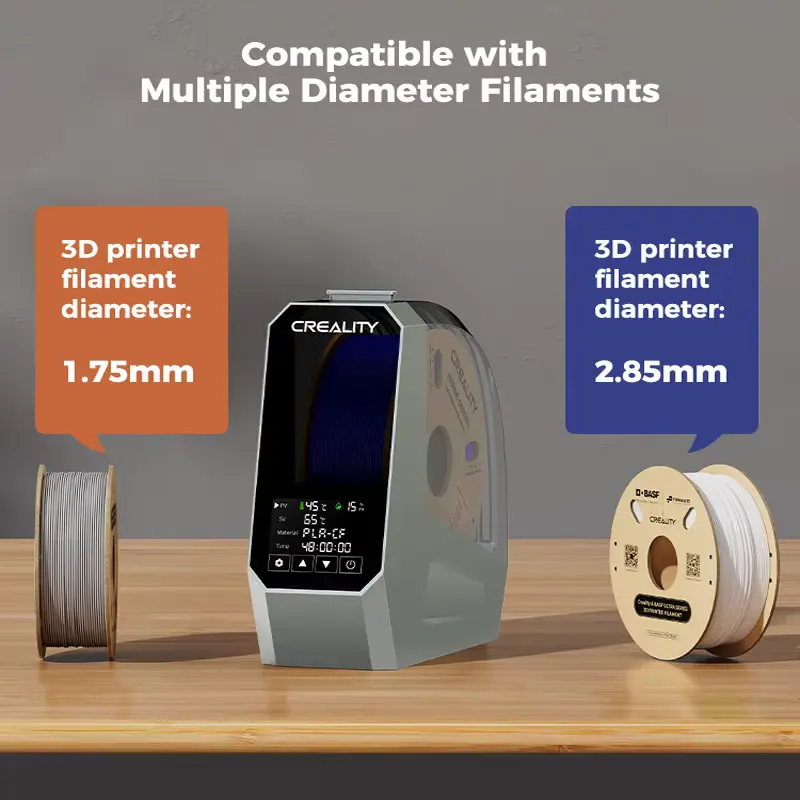
| Filament Diameter | 1.75mm / 2.85mm |
| Printing Through Dryer | Supported through filament feed design |
| Size | Approx. 31 × 30 × 13cm according to listing |
| Weight | Approx. 1.72kg according to listing |
| Plug Options | US / EU and other regional configurations |
| Spool Capacity | Single spool |
| Origin | Mainland China |
| Hands-On Testing | Not conducted |
Creality’s current SpacePi comparison lists the original SpacePi with a 45–70°C range, 1–48-hour timing, one-spool capacity, single heating chamber and 145W power consumption.
What Is the Creality Space Pi Review Filament Dryer?
The Creality Space Pi is a dedicated heated box for drying 3D printer filament.
Filament absorbs moisture from the surrounding environment at different rates depending on its material. Some materials tolerate humidity better than others, while highly hygroscopic materials can require more careful drying and storage.
Instead of placing filament in an improvised oven, a dedicated dryer gives the user a controlled temperature range specifically intended for filament.
The Space Pi combines heating, fan-assisted circulation, humidity monitoring, and timed operation inside one compact unit.
Its single-spool design makes it more suitable for individual users or smaller 3D printing setups than larger multi-spool drying systems.
The product is particularly relevant for people who notice issues such as stringing, bubbling, inconsistent extrusion, or changes in print quality after filament has been exposed to humid air.
However, drying cannot solve every printing problem.
Incorrect nozzle temperature, poor bed adhesion, unsuitable retraction settings, mechanical problems, and incorrect filament storage can also affect print quality.
Creality Space Pi Review: Drying Temperature: 45–70°C
The adjustable temperature range is one of the most important features.
The Space Pi operates from 45°C to 70°C, allowing users to select different temperatures for different filament types.
This range covers many commonly used materials.
For example, PLA generally requires a lower drying temperature than materials such as TPU, ASA, or certain nylon-based filaments.
However, users should not simply select the highest available temperature.
Every filament manufacturer can provide its own recommended drying temperature and duration.
The spool material also matters because some plastic spools can deform at higher temperatures.
The safest approach is to check the filament manufacturer’s drying instructions before starting a cycle.
Filament Drying Temperatures
Different filaments need different drying conditions. Prusa’s filament-drying guidance provides material-specific examples, including around 45°C for PLA, 55°C for PETG, 60°C for TPU, 70°C for some carbon-fibre-filled materials, and higher temperatures for certain engineering filaments.
This makes the Space Pi’s 45–70°C range practical for many common materials, but not every filament.
For example, some advanced materials require temperatures above 70°C for effective drying.
Therefore, buyers who mainly print with high-temperature engineering polymers should check their material requirements before choosing this dryer.
The Space Pi is better suited to users whose filament drying needs fall within its temperature range.
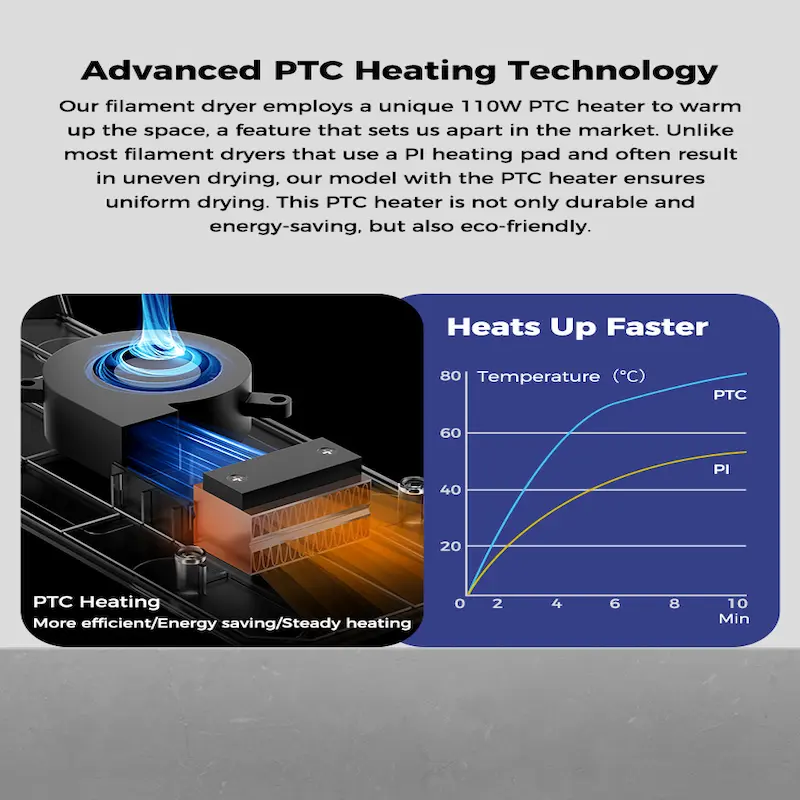
360° Hot-Air Heating
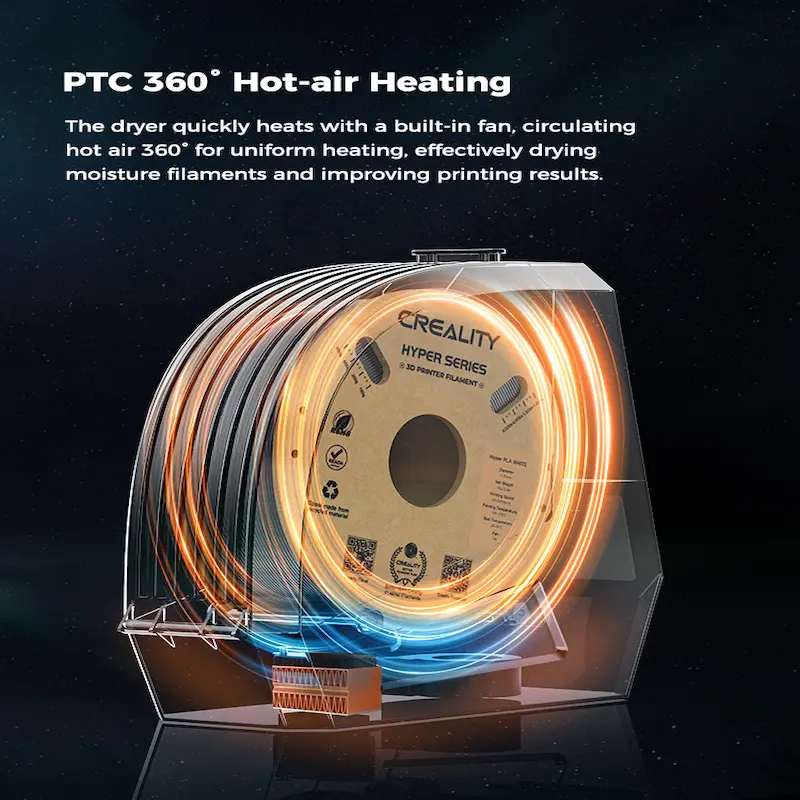
Creality uses 360° PTC hot-air heating in the Space Pi.
The design circulates heated air around the filament spool rather than relying on a simple static heat source. Creality describes the heating system as 360° hot-air heating intended to provide more even drying.
Uniform airflow matters because the spool contains a large amount of filament wound around itself.
If heat reaches only one section, the drying process may be less consistent.
The circulating-air approach is therefore a sensible design for a compact filament dryer.
However, actual drying performance depends on the filament material, starting moisture level, temperature, drying time, spool design, and surrounding conditions.
We have not independently measured temperature uniformity inside the Space Pi.
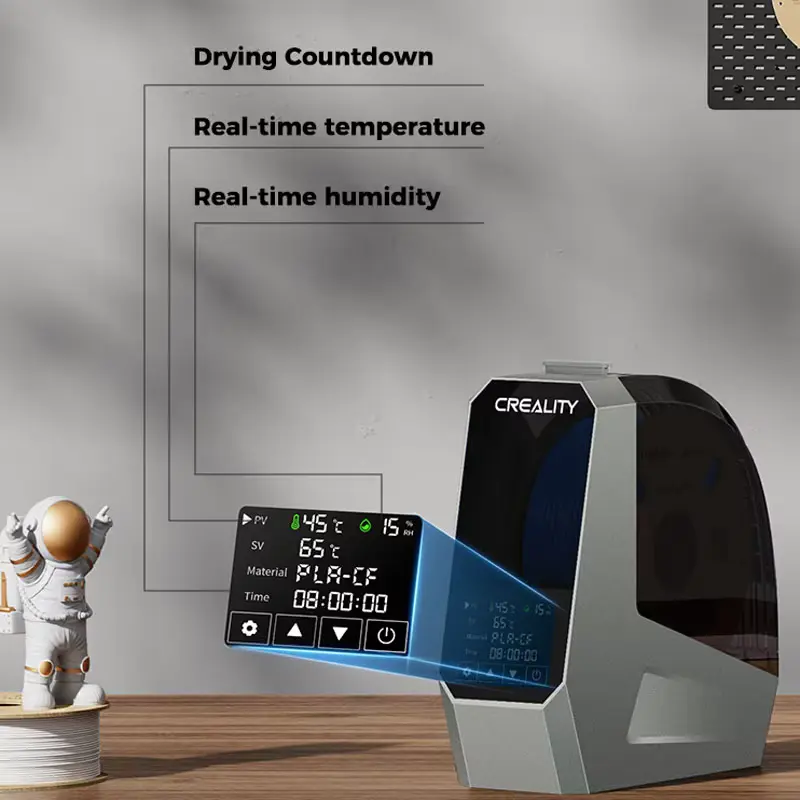
Real-Time Temperature and Humidity Monitoring
Another useful feature is the built-in monitoring system.
The Space Pi provides real-time temperature and humidity information while the drying cycle runs. Creality lists real-time humidity and temperature monitoring among the product’s main features.
This gives the user more information than a basic heated box with only a temperature dial.
Humidity information can also help users understand how the drying environment changes during a cycle.
However, the humidity reading should not be interpreted as a direct measurement of the moisture content inside the filament itself.
Relative humidity describes the air inside the chamber.
Filament moisture content depends on the material and its condition.
That distinction is important when deciding whether a spool needs additional drying.
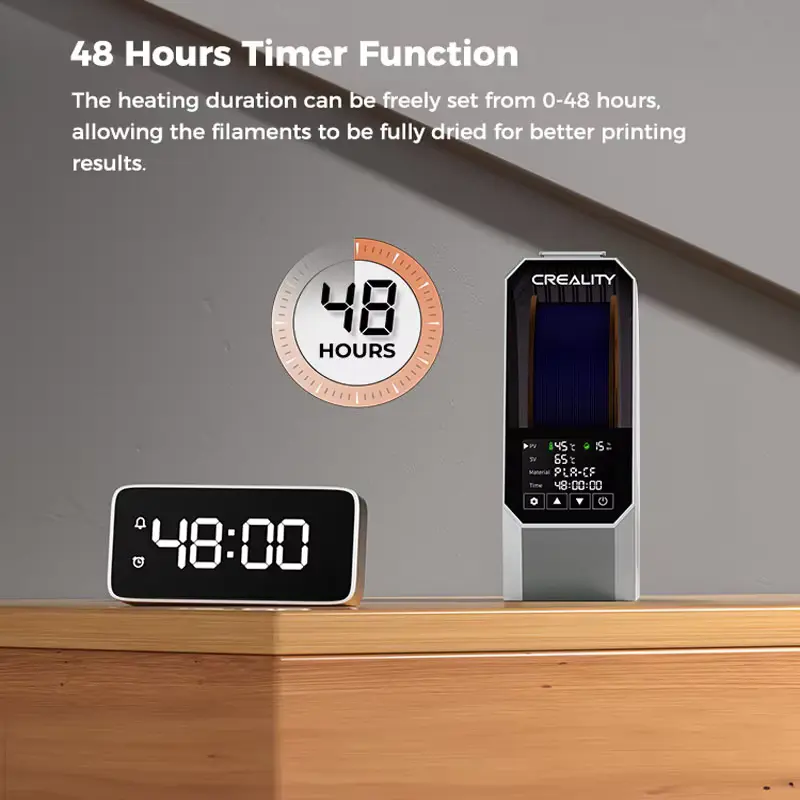
0–48 Hour Drying Timer
The Space Pi supports drying times from 1 to 48 hours, according to Creality’s current product information.
A long timer can be useful for materials that need several hours of drying.
It also allows users to start a cycle without constantly monitoring the dryer.
The correct drying duration depends on the filament.
A recently opened PLA spool may need less drying than a heavily moisture-affected nylon spool.
Users should therefore follow the filament manufacturer’s recommended drying time rather than assuming every material requires the same cycle.
One-Key Presets for 12 Filament Types
Creality also highlights one-key settings for 12 filament types.
This feature can simplify operation for users who do not want to manually calculate a temperature and time every time they dry a spool.
Presets can also reduce the chance of accidentally selecting an unsuitable setting.
Still, presets should be treated as a convenience.
The filament manufacturer’s current instructions should take priority when they differ from a general dryer preset.
Different brands can also use different formulations, additives, and spool materials.
Creality Space Pi Review for PLA Filament
PLA is one of the most common 3D printing materials.
It generally requires less aggressive drying than highly hygroscopic materials.
Prusa’s current drying guide lists 45°C for PLA/rPLA for around six hours for its own Prusament examples.
The Space Pi can therefore operate within an appropriate range for PLA.
A dry PLA spool can produce more consistent extrusion when moisture has previously caused problems.
However, not every PLA spool needs active drying after every use.
Proper storage in a sealed environment with suitable desiccant can reduce moisture exposure in the first place.
Creality Space Pi Review for PETG
PETG can also benefit from drying when moisture becomes a problem.
Prusa lists 55°C for six hours for its PETG examples.
That falls comfortably inside the Space Pi’s operating range.
PETG users may notice problems such as stringing or oozing when filament has absorbed significant moisture.
A dryer can provide a practical way to restore the filament before another print.
Again, the correct temperature and duration should come from the filament manufacturer.
Creality Space Pi Review for TPU
TPU is more moisture-sensitive than some everyday filaments.
Prusa’s current guidance lists 60°C for four to six hours for its TPU example.
That also fits within the Space Pi’s 45–70°C range.
Users printing flexible filament may therefore find a dedicated dryer particularly useful.
However, TPU can also create printing challenges unrelated to moisture, such as feeding resistance and retraction behaviour.
Drying the filament does not automatically resolve those mechanical or slicer-related issues.
Creality Space Pi Review for ABS, ASA and Other Materials
The Space Pi can also work with some higher-temperature common materials.
Its 70°C maximum can accommodate certain drying requirements, but not all.
Users should check the manufacturer’s recommended temperature for ABS, ASA, nylon, PC, PVA, carbon-fibre blends, and other materials before choosing a drying cycle.
Some engineering filaments require temperatures beyond the Space Pi’s maximum.
For those materials, a higher-temperature dryer may be more appropriate.
The Space Pi should therefore be viewed as a general-purpose filament dryer, not a universal solution for every 3D printing polymer.
Printing While Drying
A useful part of the Space Pi design is its filament-feed arrangement.
The filament can remain inside the dryer while the filament feeds toward the printer.
This means users can potentially dry the spool and continue printing without immediately removing it from the heated environment.
This can help materials that quickly absorb moisture again after drying.
The exact feed setup depends on the printer and filament path.
Users should make sure the PTFE tube or filament path does not create unnecessary friction.
The printer should also be positioned so the filament can move smoothly from the dryer to the extruder.
Why Filament Drying Matters
Moisture can noticeably affect 3D printing.
Prusa explains that absorbed humidity can cause poor surface quality, stringing, blobs, bubbling, smoke during extrusion, and reduced layer adhesion. Highly hygroscopic materials such as polyamide, PVA, and TPU may need more frequent drying.
This is why a filament dryer can be useful even when the printer itself works correctly.
A spool that printed well when new can behave differently after spending weeks in a humid environment.
The problem becomes particularly relevant in climates with high ambient humidity.
A dedicated dryer can provide a repeatable method for preparing filament before printing.
Design and Desktop Footprint
The supplied listing describes the Space Pi as approximately 31 × 30 × 13cm and around 1.72kg.
That gives it a relatively compact footprint for a single-spool dryer.
If you are building a complete desktop setup around your 3D printer, other compact peripherals can also make the workspace more practical. Our AJAZZ AJ179 V2 Review 2026: Is It Worth Buying? looks at a lightweight wireless gaming mouse that may suit a similar desk-focused setup.
The box can sit beside a desktop 3D printer without requiring the floor space of a larger drying cabinet.
The relatively low height also makes it easier to place on a workbench or printer table.
However, users should leave enough room around the unit for ventilation and safe cable placement.
The exact dimensions can vary between product documentation and packaging information, so buyers should check the current listing if available workspace is very limited.
Plug Options and International Use
The supplied listing shows multiple regional plug configurations.
The video specifically displays US Plug – 110V and EU Plug – 220V options, while Creality’s product information also identifies multiple regional versions.
Buyers should select the correct voltage and plug configuration for their region.
This is especially important with heating equipment.
Do not assume that a physical plug adapter automatically makes an incorrect-voltage model safe to use.
Check the electrical specification associated with the selected variant before ordering.
Customer Reviews and Buyer Feedback
The supplied AliExpress listing showed 4.7/5 from 99 reviews, with more than 1,000 sales and 800+ cross-platform sales at the time of recording.
The visible review section provided several useful comments.
One buyer said the dryer worked well for PLA, including normal PLA, glow-in-the-dark PLA, wood filament, PETG, and TPU. The buyer also reported noticing less stringing after drying the filament.
Another customer said they purchased two units and found them effective for keeping filament dry. They also mentioned good packaging and the products arriving in perfect condition.
A different buyer described the dryer as easy to configure and use.
Another customer specifically noted that the dryer was not extremely loud but that the fan could definitely be heard.
These comments provide useful real-world feedback about perceived drying effectiveness, setup, packaging, and noise.
However, customer reports remain individual experiences.
They do not independently prove the exact drying performance of the machine across every filament type.
Noise During Operation
The Space Pi uses a fan to circulate heated air.
That means some operating noise is expected.
One visible customer specifically said that the fan was audible but did not describe the dryer as extremely loud.
For a home workshop, this may be acceptable.
However, users who keep their 3D printer beside a bed, in a bedroom, or in a very quiet office should consider fan noise before starting a long drying cycle.
The actual perceived noise can also vary depending on the surrounding surface and room acoustics.
We have not independently measured the Space Pi’s decibel level.
Safety and Temperature Considerations
A filament dryer is a heating appliance, so users should treat it differently from a passive storage box.
Do not cover ventilation areas.
Keep flammable materials away from the appliance.
Do not exceed the recommended drying temperature for the filament or spool.
The dryer should also sit on a stable, heat-resistant surface.
Most importantly, the correct temperature depends on the filament.
Selecting a temperature simply because it is the maximum available can damage some materials or deform certain spool designs.
Always check the filament manufacturer’s drying instructions first.
Creality Space Pi vs Passive Dry Box
A passive dry box and an active filament dryer serve related but different purposes.
| Feature | Creality Space Pi | Passive Dry Box |
|---|---|---|
| Active Heating | Yes | No |
| Moisture Removal | Active drying | Mainly prevents moisture exposure |
| Temperature Control | 45–70°C | No active heating |
| Humidity Monitoring | Yes | Depends on box |
| Drying Timer | 1–48h | Usually no |
| Fan Circulation | Yes | Usually no |
| Single-Spool Use | Yes | Depends on design |
| Best Use | Drying damp filament | Keeping dry filament dry |
| Power Required | Yes | Usually no |
A passive dry box can be excellent for storage.
However, if filament has already absorbed moisture, simply placing it inside a sealed box with desiccant does not necessarily dry it.
Prusa specifically distinguishes dry boxes from active drying systems and notes that a dry box helps maintain low humidity rather than actively drying already-wet filament.
That makes the Space Pi more useful when you need active drying rather than simple storage.


Creality Space Pi vs Larger Multi-Spool Dryers
Creality’s SpacePi range now includes larger systems such as the SpacePi Plus and newer multi-spool SpacePi models.
The original SpacePi focuses on one spool, while the SpacePi Plus provides two-spool capacity. Creality’s current comparison also lists newer four-spool models with higher temperature ranges and additional features.
| Feature | Space Pi | Larger Multi-Spool Dryer |
|---|---|---|
| Spool Capacity | 1 | 2 or more |
| Space Required | Lower | Higher |
| Drying Temperature | 45–70°C | Depends on model |
| Multiple Materials | One at a time | Multiple at once |
| Power | 145W | Higher on larger models |
| Best For | Individual users | Multi-filament workflows |
| Portability | Easier | Less convenient |
If you normally dry one spool at a time, the original Space Pi can keep the setup simpler.
If you regularly work with several filaments simultaneously, a multi-spool dryer may better fit your workflow.
Creality Space Pi and Your 3D Printing Setup
The Space Pi can complement a desktop 3D printer rather than replace any part of the printer itself.
A typical workflow could look like this:
- Select the filament.
- Check its recommended drying temperature.
- Place the spool inside the Space Pi.
- Select the appropriate temperature.
- Set the drying duration.
- Monitor temperature and humidity.
- Feed the filament toward the printer if appropriate.
- Start the print after the filament reaches the required condition.
- Store the remaining filament in a sealed, dry environment.
This workflow can be particularly useful for users who regularly switch between materials.
It also provides a dedicated location for the spool instead of using improvised heating methods.
How to Use the Creality Space Pi
Step 1: Check the Filament Instructions
Find the recommended drying temperature and time for your exact filament.
Step 2: Open the Dryer
Place the spool inside the Space Pi and ensure that it rotates freely.
Step 3: Set the Temperature
Choose a temperature within the 45–70°C range that matches the filament manufacturer’s recommendation.
Step 4: Set the Drying Time
Select the required duration.
The Space Pi supports drying periods up to 48 hours.
Step 5: Start the Cycle
Allow the heating and airflow system to operate.
Step 6: Monitor the Display
Watch the temperature and humidity readings during the cycle.
Step 7: Feed the Filament
If your printer setup supports feeding directly from the dryer, guide the filament through the appropriate outlet.
Step 8: Store the Filament Properly
After drying, avoid leaving the spool exposed to humid air unnecessarily.
A sealed storage container with suitable desiccant can help maintain the dry condition.
What to Check Before Buying
1. Check Your Filament Types
Make sure your regular materials fit within the Space Pi’s 45–70°C temperature range.
2. Check Spool Size
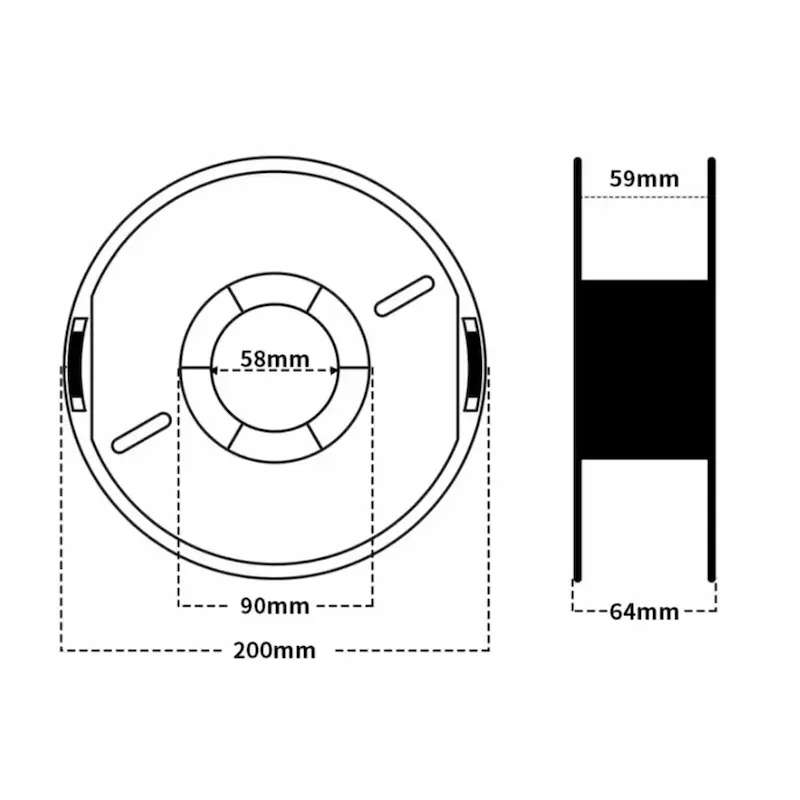
Confirm that your spool physically fits inside the dryer.
3. Confirm One-Spool Capacity
The original Space Pi holds one spool.
If you regularly need two or more spools, consider a larger dryer.
4. Check Your Voltage
Select the correct regional electrical version.
5. Consider Noise
The unit contains a fan, so some operating sound is normal.
6. Consider Workspace
The dryer needs enough room around it for safe operation and access to the filament path.
7. Check Your Printer’s Filament Path
If you plan to print while drying, make sure the path from the dryer to the printer does not create excessive friction.
8. Follow Filament Manufacturer Instructions
Do not assume that every spool should use the same temperature or drying time.
A well-organised maker desk often includes more than the printer and filament accessories. If you are also upgrading your keyboard for gaming, work, or general desktop use, our AKKO TAC75 HE Review 2026: Is It Worth Buying? covers another enthusiast-focused PC accessory worth considering.
Creality Space Pi Review: Pros and Cons
Pros
- 45–70°C adjustable drying temperature
- 1–48-hour drying timer
- 360° PTC hot-air heating
- Real-time temperature monitoring
- Real-time humidity monitoring
- One-key settings for 12 filament types
- Supports one spool
- Suitable for many common filament types
- Can support filament feeding toward the printer
- Compact desktop design
- Approximately 1.72kg according to the supplied listing
- Multiple regional plug options
- Simple interface
- Strong marketplace feedback at the time of capture
- Useful for PLA, PETG, TPU and other compatible materials
- Dedicated alternative to improvised drying methods
Cons
- One-spool capacity
- Maximum temperature is 70°C
- Not suitable for every high-temperature engineering filament
- Fan noise is audible according to one customer
- Requires electrical power
- Drying performance depends on filament type and starting moisture level
- Does not replace proper filament storage
- Actual temperature uniformity was not independently tested
- Actual humidity accuracy was not independently tested
- Product dimensions and included accessories can vary by regional configuration
Who Should Buy the Creality Space Pi?
3D Printing Hobbyists
The Space Pi is particularly relevant to home users who regularly print with filament that can absorb moisture.
PLA and PETG Users
Its temperature range covers common drying requirements for many PLA and PETG products.
TPU Users
Flexible filament can benefit from controlled drying, and the Space Pi’s temperature range can accommodate many TPU drying recommendations.
Users in Humid Environments
People who live in humid environments may notice moisture-related filament problems more often.
A dedicated dryer can provide a repeatable way to prepare filament.
Small 3D Printing Workspaces
The single-spool design and compact footprint make it practical for a small desktop workshop.
Users Who Want Simple Controls
The preset system and adjustable timer reduce the need to manually manage every drying session.
Who Should Skip It?
You may want another solution if you:
- Need to dry several spools simultaneously
- Regularly use materials requiring temperatures above 70°C
- Need active long-term dry storage for highly hygroscopic materials
- Want a completely silent drying solution
- Have very limited desk space
- Already have a suitable active filament dryer
- Only print occasionally with materials that rarely need drying
A larger dryer may also make more sense for multi-colour printing workflows or users who regularly prepare several spools at once.
Review Methodology: What We Considered
This Creality Space Pi Review is based on the supplied AliExpress product-listing video, visible product specifications, official Creality information, visible customer feedback, filament-drying research, comparison research, and practical buying considerations.
We considered:
- Drying temperature
- Drying duration
- 360° PTC heating
- Air circulation
- Humidity monitoring
- Temperature monitoring
- Filament presets
- Single-spool capacity
- Filament compatibility
- Desktop footprint
- Regional plug options
- Customer feedback
- Noise comments
- Printing-from-dryer functionality
- Storage considerations
- Safety considerations
- Limitations for high-temperature materials
We have not personally conducted hands-on testing of the Creality Space Pi.
Therefore, we do not claim to have independently measured:
- Actual chamber temperature accuracy
- Temperature uniformity
- Humidity sensor accuracy
- Drying efficiency
- Noise level in decibels
- Energy consumption during a complete cycle
- Filament moisture content before and after drying
- Long-term durability
The marketplace customer comments provide useful user experiences, while Creality’s specifications provide the documented product capabilities. Actual results can vary according to filament material, spool condition, drying settings, ambient humidity, and storage practices.
Final Verdict: Is the Creality Space Pi Review Worth Buying?
The Creality Space Pi Filament Dryer is a practical accessory for 3D printing users who want a dedicated way to dry moisture-affected filament.
Its strongest features are the 45–70°C temperature range, 1–48-hour timer, 360° PTC hot-air circulation, real-time humidity and temperature monitoring, and preset drying modes.
The one-spool design keeps the unit compact and straightforward.
For a hobbyist with one active printer, that can be more convenient than buying a large multi-spool dryer.
The temperature range also works well for many common materials.
PLA, PETG, and TPU can all have drying requirements that fall within the Space Pi’s operating range, although the exact temperature and duration should always come from the filament manufacturer.
The biggest limitation is the 70°C maximum.
Users who regularly print with high-temperature engineering materials may need a dryer capable of reaching higher temperatures.
The single-spool capacity also limits the usefulness of the Space Pi for multi-material or multi-printer workflows.
The customer feedback in the supplied listing is encouraging, with a 4.7/5 marketplace rating from 99 reviews at the time of capture. Buyers mentioned effective drying, reduced stringing, good packaging, and straightforward operation. One customer also noted that the fan is audible during operation.
Final Rating: 4.6/5 ⭐⭐⭐⭐⭐
Our Verdict: The Creality Space Pi is a well-targeted filament dryer for 3D printing hobbyists who want controlled heating, humidity monitoring, and a compact one-spool setup. It is especially relevant for PLA, PETG, TPU, and other materials whose recommended drying temperatures fit within its 45–70°C range.
It becomes less suitable if you need multiple spools at once or regularly work with engineering filaments that require temperatures above 70°C.
For users with a single 3D printer and recurring moisture-related filament problems, the Space Pi provides a dedicated and straightforward drying workflow.
Ready to Check the Creality Space Pi?
Before purchasing, check the exact model, regional plug, supported spool dimensions, filament compatibility, recommended drying temperature, and included accessories.
Most importantly, match the dryer setting to the specific filament manufacturer’s recommendations rather than automatically selecting the highest available temperature.