
Affiliate Disclosure: This article contains affiliate links. If you purchase through a qualifying link, we may earn a commission at no additional cost to you. This review is based on published product specifications, available product information, visible customer feedback, comparison research, and practical buying considerations. We have not personally conducted hands-on testing of the AJAZZ AJ179 V2 Review.
Quick Verdict: AJAZZ AJ179 V2 Review
The AJAZZ AJ179 V2 Review covers a lightweight right-handed gaming mouse designed around a compact ergonomic shape, PAW3311 optical sensor, tri-mode connectivity, Huano micro switches, and a rechargeable battery.
The supplied AliExpress listing identifies the product as the AJAZZ AJ179 V2 MAX, with a 56g lightweight design, PAW3311 sensor, Huano micro switches, and 2.4GHz wireless, Bluetooth, and USB wired connectivity. The listing also displays several related AJ179 configurations, including AJ179 V2, AJ179 V2 MAX, AJ179P, and other variants.
The selected variants can differ significantly.
For example, the AJ179 V2 MAX uses an 800mAh battery and weighs approximately 56g, while the standard AJ179 V2 uses a 400mAh battery and weighs approximately 49g, according to the available product documentation. Both versions use the PAW3311 sensor and support up to 12,000 DPI through software.
The marketplace recording showed a 4.8/5 rating from 15 reviews and 102 sold at the time of capture. The visible review panel also showed 4.8 from 15 ratings, with buyers mentioning attractive design, fast delivery, affordability, and satisfying performance.
The main attraction is the combination of a lightweight shell, ergonomic right-handed shape, wireless connectivity, and a mainstream gaming sensor.
Our Rating: 4.5/5 ⭐⭐⭐⭐⭐
For PC gamers who want a lightweight wireless mouse without moving to an extremely expensive flagship model, the AJ179 V2 series offers an interesting feature set. However, buyers should pay close attention to the exact variant because the AJ179 family contains several versions with different sensors, batteries, weights, and connectivity features.

AJAZZ AJ179 V2 Review: Specifications
| Feature | Details |
|---|---|
| Brand | AJAZZ |
| Model | AJ179 V2 / AJ179 V2 MAX |
| Mouse Type | Wireless gaming mouse |
| Shape | Right-handed ergonomic |
| Sensor | PixArt PAW3311 |
| Maximum DPI | Up to 12,000 DPI |
| Tracking Speed | Up to 300 IPS |
| Acceleration | Up to 35G |
| Polling Rate | Up to 1000Hz |
| Connectivity | 2.4GHz, Bluetooth, USB wired |
| AJ179 V2 Battery | 400mAh |
| AJ179 V2 MAX Battery | 800mAh |
| AJ179 V2 Weight | Approx. 49g |
| AJ179 V2 MAX Weight | Approx. 56g |
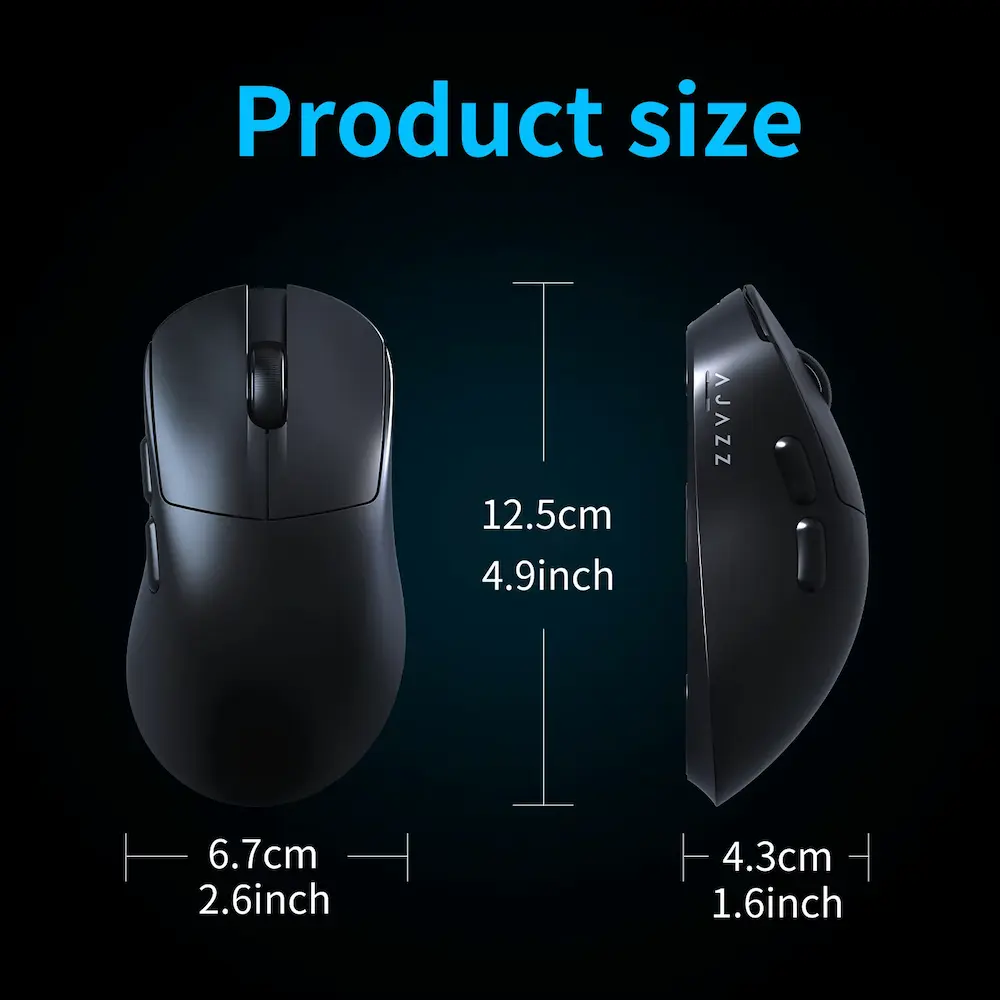
| Dimensions | Approx. 125 × 67 × 43mm |
| Main Switches | Huanuo micro switches |
| AJ179 V2 Switch Rating | Approx. 50 million clicks |
| AJ179 V2 MAX Switch Rating | Approx. 100 million clicks |
| Scroll Encoder | Approx. 1 million turns |
| Connection Port | USB-C |
| Feet | Teflon |
| Shell | ABS injection molding |
| Software | AJAZZ driver/software |
| Compatible Systems | Windows and Mac |
| Hands-On Testing | Not conducted |
Specifications can vary between AJ179 versions and marketplace configurations, so check the exact variant before ordering.
What Is the AJAZZ AJ179 V2 Review?
The AJAZZ AJ179 V2 is a lightweight gaming mouse designed for right-handed users.
Its shape focuses on ergonomic support rather than a completely symmetrical design.
The mouse combines that shape with a relatively low weight, wireless connectivity, a PAW3311 optical sensor, and Huano micro switches.
The AJ179 V2 family is slightly confusing because marketplace listings can group several models under the same product page.
The supplied listing includes the AJ179 V2 MAX as one of the highlighted configurations, while other selectable versions include AJ179 V2 and AJ179P models.
That means buyers should not assume that every AJ179 shown on the product page has identical specifications.
The AJ179 V2 MAX is the heavier 56g version with an 800mAh battery, while the standard AJ179 V2 weighs around 49g and uses a 400mAh battery.
This review therefore focuses on the AJ179 V2 family while clearly separating the major differences between the V2 and V2 MAX.
AJAZZ AJ179 V2 Review: Design and Ergonomics
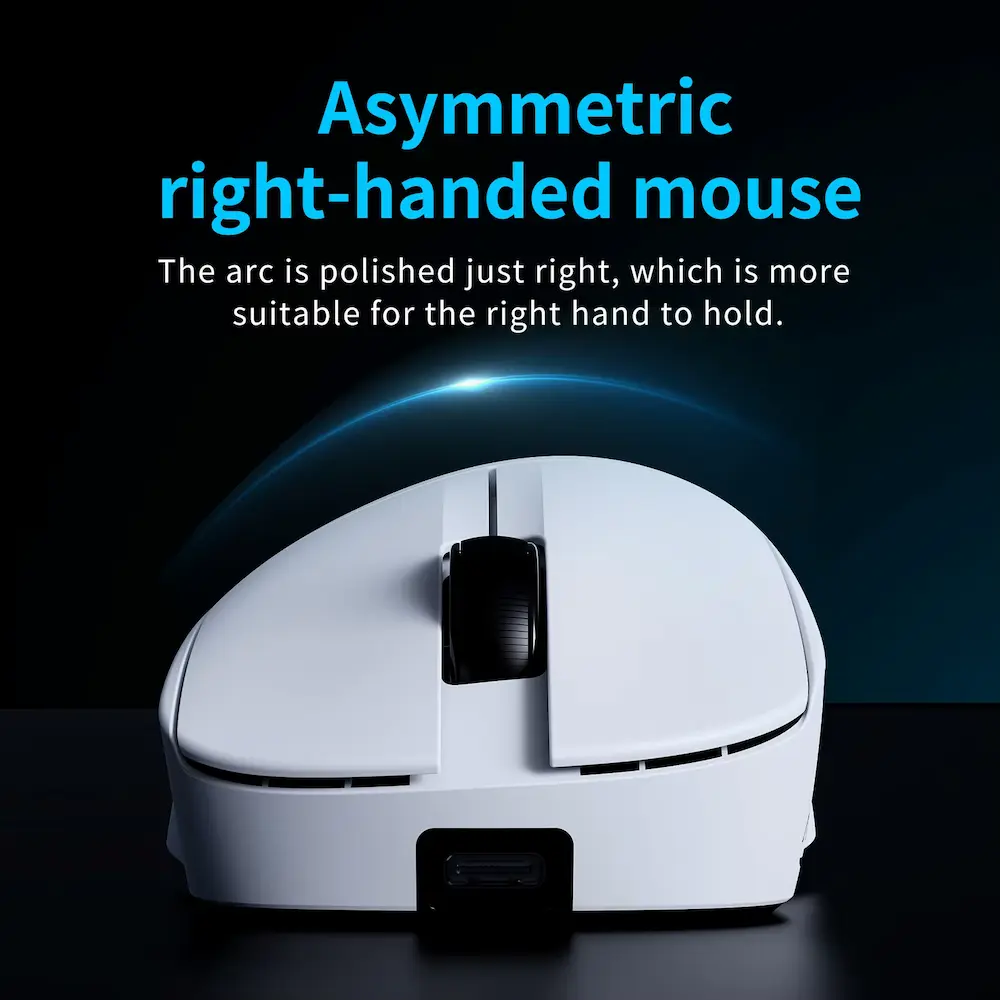
The mouse uses a right-handed ergonomic shape.
That design can provide a more natural position for the hand than a symmetrical mouse, particularly for users who prefer palm or claw-style grips.
The available documentation lists dimensions of approximately 125 × 67 × 43mm for the AJ179 V2 and V2 MAX.
The relatively large length combined with the right-handed shape makes the mouse more interesting for medium-to-large hands than for users who prefer very compact mice.
However, hand comfort depends heavily on individual hand size and grip style.
A mouse that feels comfortable for one person can feel too tall, too long, or too narrow for another.
The AJ179 V2 also has two side buttons, giving gamers additional controls without making the mouse overly complex.
The supplied product images show a clean shell with a traditional gaming-mouse layout.
The design avoids the aggressive styling found on some gaming peripherals, which means it can also fit into a more understated desktop setup.
Lightweight Gaming Design
Weight is one of the most noticeable specifications of the AJ179 V2 family.
The standard AJ179 V2 weighs approximately 49g, while the V2 MAX weighs approximately 56g.
Both are relatively lightweight compared with many traditional wireless gaming mice.
A lower weight can make large mouse movements easier, especially in FPS games where players frequently lift and reposition the mouse.
It can also reduce the physical effort required during long gaming sessions.
However, lighter does not automatically mean better.
Some users prefer a heavier mouse because it provides a more planted feeling on the mousepad.
The right choice depends on personal preference, sensitivity settings, and grip style.
The 49g standard V2 is the more weight-focused option, while the 56g V2 MAX adds a larger battery.
PAW3311 Sensor
The AJAZZ AJ179 V2 uses the PixArt PAW3311 optical sensor.
Available product documentation lists a maximum software-adjustable DPI of up to 12,000 DPI, along with up to 300 IPS tracking speed and 35G acceleration.
These specifications place the sensor firmly in the gaming-mouse category.
For normal PC gaming, 12,000 DPI provides considerably more range than most players will actually need.
Many competitive FPS players use much lower sensitivity settings.
Therefore, the maximum DPI number should not be treated as the main indicator of mouse quality.
Tracking consistency, shape, weight, click behaviour, feet, software, and connection stability all contribute to the overall experience.
The PAW3311 gives the AJ179 V2 a solid specification for a lightweight gaming mouse, but we have not independently tested its sensor accuracy, motion delay, lift-off distance, or tracking performance.
AJAZZ AJ179 V2 DPI Settings
The product documentation lists basic DPI adjustment in several preset steps, while the driver software can provide a wider range up to 12,000 DPI.
This gives users the ability to create different sensitivity profiles.
For example:
- Lower DPI can suit tactical FPS games.
- Medium DPI can work well for general gaming.
- Higher DPI can benefit desktop navigation.
- Separate profiles can make switching between games easier.
The important point is that DPI controls cursor sensitivity rather than directly determining accuracy.
A high DPI setting does not automatically make a mouse more precise.
Instead, it gives the user a different sensitivity range to work with.
Mouse Polling Rate and Gaming Performance
The AJ179 V2 and V2 MAX support up to 1000Hz polling in wired and 2.4GHz wireless modes, while Bluetooth uses a lower 125Hz rate.
The mouse polling rate describes how frequently the mouse reports its position to the computer. A 1000Hz setting means the mouse can send up to 1,000 position reports per second.
For gaming, 1000Hz remains a useful standard.
It provides frequent position updates without requiring the extremely high processing demands associated with some modern 4K or 8K gaming mice.
The advantage becomes more relevant in fast-paced games where smooth mouse movement matters.
However, a higher polling rate does not automatically make someone a better player.
Monitor refresh rate, game performance, sensitivity settings, sensor behaviour, and personal skill all contribute to the overall experience.
The AJ179 V2’s 1000Hz maximum is therefore better viewed as a practical gaming specification rather than a guarantee of superior performance.
2.4GHz Wireless Connectivity
The 2.4GHz wireless connection is one of the most useful features of the AJ179 V2.
A dedicated wireless receiver allows the mouse to operate without a cable while maintaining a higher reporting rate than Bluetooth.
The documentation lists up to 1000Hz for 2.4GHz mode.
For gaming, this should be the preferred wireless mode when the lowest practical latency and highest polling rate matter.
It also keeps the desk cleaner because the mouse cable does not need to remain connected during normal use.
The receiver needs to remain within a suitable range of the computer, and the mouse still requires occasional charging.
Bluetooth Connectivity
Bluetooth provides another connection option for compatible devices.
The documentation lists 125Hz for Bluetooth mode, with the driver unable to increase that rate.
That makes Bluetooth more suitable for everyday productivity than competitive gaming.
For example, you could use Bluetooth with a laptop when browsing, working, or travelling, then switch to 2.4GHz when gaming on a desktop.
This flexibility is one of the more practical features of the AJ179 V2.
It also means you do not have to dedicate the mouse exclusively to a gaming PC.
USB-C Wired Mode
The AJ179 V2 also supports a wired USB connection through USB-C.
Wired operation can be useful when the battery needs charging or when you want a direct connection during longer gaming sessions.
The documentation lists up to 1000Hz in wired mode.
A USB-C connection also makes the mouse easier to recharge because the same cable handles charging and data.
For a permanent gaming desk, you can keep the wireless receiver connected and use the cable only when necessary.
Battery Capacity and Runtime
Battery capacity differs between the AJ179 V2 and V2 MAX.
The standard V2 uses a 400mAh battery, while the V2 MAX uses an 800mAh battery.
The larger V2 MAX battery is useful for users who want longer wireless sessions between charges.
Available documentation estimates approximately:
- 58 hours with lighting on in 2.4GHz mode
- 63 hours with lighting off in 2.4GHz mode
- 76 hours with lighting on in Bluetooth mode
- 85 hours with lighting off in Bluetooth mode
These figures apply to the 800mAh V2 MAX documentation and should be treated as manufacturer/manual estimates rather than independently tested results.
Actual battery life can vary with lighting, polling rate, usage, wireless mode, firmware, and battery condition.
For buyers who prioritize battery capacity, the V2 MAX is clearly the more interesting configuration.
Huano Micro Switches
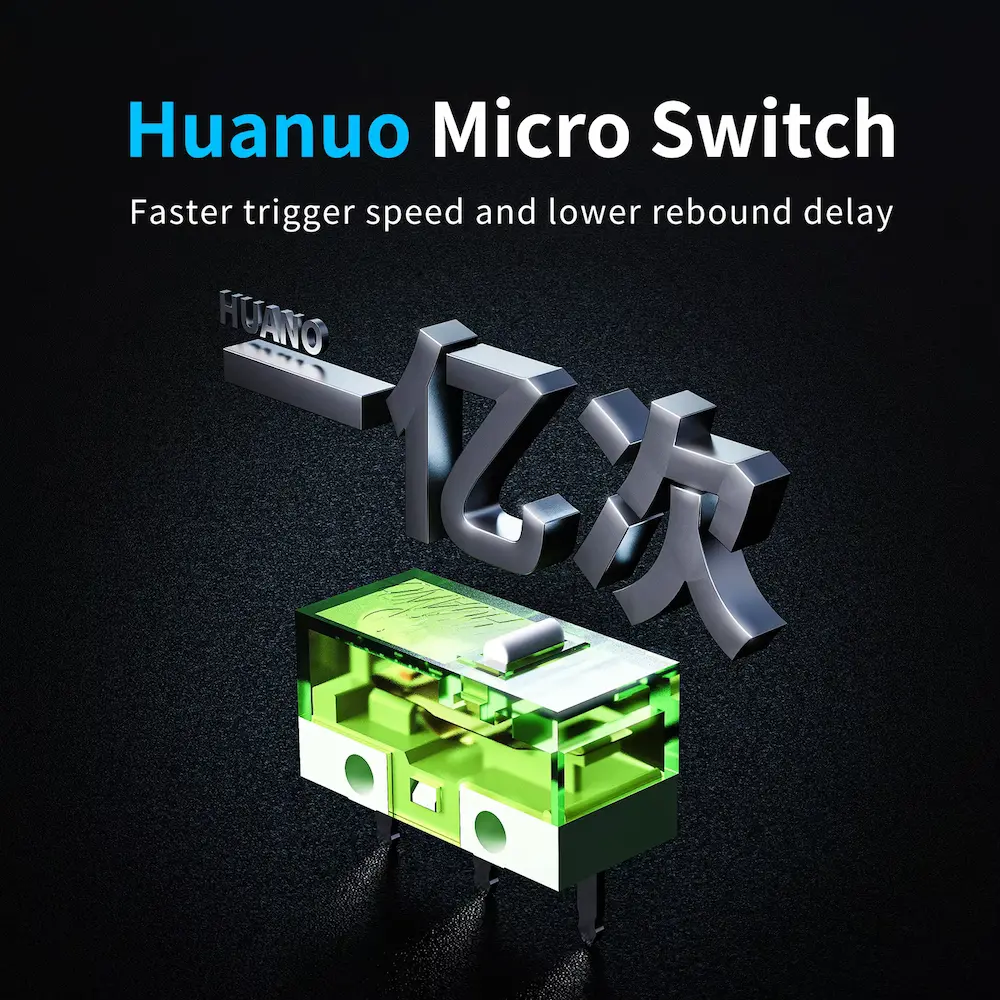
The AJ179 V2 family uses Huano micro switches for its primary buttons.
The documentation distinguishes between the standard V2 and V2 MAX.
The standard V2 uses switches rated around 50 million clicks, while the V2 MAX version uses Huano switches rated around 100 million clicks.
A high click rating indicates the manufacturer’s durability target for the switch.
It does not guarantee that every mouse will reach that number under every usage condition.
Button feel also matters.
Click weight, sound, rebound, and consistency can affect how the mouse feels during gaming.
Because we have not personally tested the mouse, we do not claim a specific click feel or sound profile.
Scroll Wheel and Side Buttons
The AJ179 V2 documentation lists a scroll encoder rated for approximately one million turns.
The mouse also provides two side buttons.
This is a practical configuration for FPS, MOBA, browser, and productivity use.
The side buttons can be assigned to game actions or common desktop functions through supported software.
For example, gamers may use them for melee attacks, abilities, reloads, or other secondary actions.
For productivity, they can be useful for browser navigation or application shortcuts.
Teflon Mouse Feet
The AJ179 V2 uses Teflon feet according to the available specifications.
Mouse feet influence how easily the mouse glides across the pad.
Lightweight construction combined with low-friction feet can make the mouse feel more agile.
However, the actual glide depends on both the feet and the mousepad surface.
A control-style cloth pad will feel different from a fast cloth pad or hard surface.
Therefore, buyers should consider the mousepad as part of the overall setup rather than judging glide from the mouse alone.
AJAZZ Software and Customization
The AJ179 V2 supports AJAZZ driver software.
The software can provide access to DPI adjustments, polling-rate settings, profiles, and other mouse functions depending on the specific version.
This is useful because the hardware supports multiple connection modes.
Users can create settings that work for different games or everyday tasks.
For example, you might prefer:
- 800 DPI for FPS gaming
- 1000–1600 DPI for general desktop use
- 2.4GHz for gaming
- Bluetooth for laptop productivity
The exact available options can vary with the driver version and model.
Before installing software, verify that you have selected the correct AJ179 V2 configuration.
Customer Reviews and Buyer Feedback
The supplied AliExpress listing showed a 4.8/5 rating from 15 reviews and 102 sold at the time of capture.
The review panel displayed 4.8 from 15 ratings, with visible tags including:
- Affordable price
- Attractive design
- Fast delivery
- Satisfying performance
One visible buyer selected the 179V2 BLACK configuration and said the mouse arrived in perfect condition before the expected delivery time.
Another buyer selected the 179V2 MAX WHITE configuration and said the mouse was very good and that their daughter was very satisfied.
The review panel also showed customer photographs.
These comments provide useful information about buyer satisfaction, packaging, delivery, and general impressions.
However, the review sample is still relatively small.
The visible feedback does not provide enough evidence to independently verify long-term battery life, sensor accuracy, click durability, or wireless latency.
Those characteristics require controlled testing.

AJAZZ AJ179 V2 Review Variants
The product page is particularly important to examine because several AJ179 configurations appear together.
AJ179 V2
The standard V2 uses:
- PAW3311 sensor
- Up to 12,000 DPI
- 400mAh battery
- Approximately 49g weight
- 2.4GHz
- Bluetooth
- USB wired
- Up to 1000Hz reporting
AJ179 V2 MAX
The V2 MAX increases the battery capacity to:
- 800mAh battery
- Approximately 56g weight
- PAW3311 sensor
- Up to 12,000 DPI
- 2.4GHz
- Bluetooth
- USB wired
- Up to 1000Hz reporting
The V2 MAX therefore trades a little additional weight for a larger battery.
AJ179P and Other AJ179 Models
The same marketplace page can also display other AJ179-series models.
These may use different sensors and specifications.
For example, the AJ179P is associated with the PAW3395 sensor in available documentation, while other AJ179 models can use PAW3395 or PAW3950 sensors.
Do not assume that an AJ179P, AJ179 PRO, or AJ179 APEX has the same hardware as the AJ179 V2.
Always check the selected model name before ordering.
AJAZZ AJ179 V2 vs AJAZZ AJ179P
| Feature | AJ179 V2 | AJ179P |
|---|---|---|
| Sensor | PAW3311 | PAW3395 |
| Maximum DPI | Up to 12,000 | Up to 26,000 |
| Connectivity | 2.4G + Bluetooth + Wired | 2.4G + Wired |
| Polling | Up to 1000Hz | Up to 1000Hz |
| Battery | 400mAh | 400mAh |
| Weight | Approx. 49g | Approx. 58g |
| Main Focus | Lightweight tri-mode | Higher sensor specification |
The AJ179P offers a higher-end PAW3395 sensor, while the V2 emphasizes a lighter design and tri-mode flexibility.
The correct choice depends on whether sensor specifications or lower weight and Bluetooth connectivity matter more to you.
AJAZZ AJ179 V2 vs AKKO TAC75 HE
Gaming mice and keyboards obviously perform different jobs, but they can form part of the same competitive PC setup.
Our AKKO TAC75 HE Review 2026: Is It Worth Buying? covers a 75% Hall Effect gaming keyboard with adjustable actuation and Rapid Trigger.
The AJ179 V2 complements that type of keyboard because it focuses on lightweight mouse movement and wireless flexibility.
| Feature | AJAZZ AJ179 V2 | AKKO TAC75 HE |
|---|---|---|
| Product | Gaming Mouse | Gaming Keyboard |
| Main Technology | Optical sensor | Hall Effect switches |
| Weight | Approx. 49g V2 | Keyboard |
| Wireless | 2.4G + Bluetooth | Wired |
| Gaming Focus | Mouse movement | Key input |
| Adjustable DPI | Yes | N/A |
| Rapid Trigger | N/A | Yes |
| RGB | Variant-dependent | Yes |
Together, these products can form a compact competitive gaming setup.
AJAZZ AJ179 V2 vs AULA F87 Pro V2
The AULA F87 Pro V2 Review 2026: Is It Worth Buying? covers a TKL gaming keyboard designed around magnetic switches, tri-mode connectivity, RGB lighting, and a large rechargeable battery.
The two products again serve different roles, but both target users who want gaming-focused hardware with flexible features.
The AULA keyboard uses a larger TKL layout, while the AJ179 V2 provides a compact mouse design.
This combination can work well for a desktop setup where the keyboard provides extensive controls, and the mouse prioritizes low weight and movement.
AJAZZ AJ179 V2 Review: Pros and Cons
Pros
- Lightweight design
- Right-handed ergonomic shape
- PAW3311 optical sensor
- Up to 12,000 DPI
- Up to 300 IPS
- Up to 35G acceleration
- 2.4GHz wireless
- Bluetooth connectivity
- USB-C wired connection
- Up to 1000Hz reporting
- 400mAh standard V2 battery
- 800mAh V2 MAX battery
- V2 MAX weighs approximately 56g
- Standard V2 weighs approximately 49g
- Huano micro switches
- Up to 100 million-click rating on V2 MAX
- Two side buttons
- Teflon feet
- Multiple color options
- Suitable for FPS and general gaming
- Can also work as a productivity mouse
Cons
- Exact specifications vary between AJ179 versions
- Some listings combine multiple AJ179 models on one product page
- PAW3311 is not the highest-end sensor in the AJ179 family
- 1000Hz is lower than some newer 4K/8K gaming mice
- Bluetooth uses a lower 125Hz reporting rate
- Battery runtime depends on settings and usage
- No independent sensor testing in this review
- No hands-on testing was conducted
- Shape may not suit every hand size or grip
- Buyers must carefully check the selected variant
Who Should Buy the AJAZZ AJ179 V2 Review?
The AJ179 V2 may suit several types of users.
FPS Gamers
The lightweight body and 1000Hz polling can make the mouse suitable for competitive FPS setups.
Users Who Prefer Lightweight Mice
The approximately 49g standard V2 is particularly interesting for users who want to reduce mouse weight.
Right-Handed Gamers
The ergonomic shape is designed specifically around right-handed use.
Wireless Gaming Setup Owners
The 2.4GHz connection removes the mouse cable during normal gaming.
Multi-Device Users
Bluetooth gives the mouse another connection method for compatible laptops and other devices.
Budget-Conscious Gaming Setup Builders
The AJ179 V2 family offers gaming-oriented specifications without requiring the type of flagship hardware used in premium setups.
Who Should Skip It?
You may want another mouse if you:
- Prefer symmetrical or ambidextrous shapes
- Need a 4K or 8K polling rate
- Want the highest-end sensor available
- Require many programmable buttons
- Prefer a very small mouse
- Need extensive onboard controls
- Want a mouse specifically designed for left-handed use
- Do not want to manage a rechargeable battery
Users who want a higher-end sensor within the AJ179 family may also want to compare the PAW3395-based AJ179P or other AJ179 variants.
AJAZZ AJ179 V2 for FPS Gaming
FPS gaming is one of the strongest use cases for a lightweight mouse.
The lower weight can make rapid movements and repositioning easier.
The 2.4GHz wireless mode also avoids the physical drag associated with a traditional wired mouse cable.
The PAW3311 sensor provides up to 12,000 DPI and 300 IPS according to the available documentation.
For most players, however, the maximum DPI number matters less than the mouse’s shape, sensitivity, tracking consistency, and comfort.
A player using 800 DPI and low in-game sensitivity may never need to approach 12,000 DPI.
The 1000Hz polling rate is also sufficient for many gaming setups.
Higher polling rates exist, but they can require more system resources and compatible games and hardware to take full advantage of them.
AJAZZ AJ179 V2 for Everyday Work
The mouse is not limited to gaming.
Bluetooth connectivity can make it useful for everyday laptop work, while the ergonomic right-handed shape can suit longer desktop sessions.
The side buttons can also improve browser navigation or productivity shortcuts.
For office use, you may prefer Bluetooth because it conserves battery compared with continuously using higher-performance wireless settings.
For gaming, switching back to 2.4GHz provides the more appropriate connection mode.
This flexibility gives the AJ179 V2 more everyday usefulness than a gaming mouse that only supports one connection type.
How to Set Up the AJAZZ AJ179 V2
Step 1: Charge the Mouse
Connect the USB-C cable and allow the battery to charge before extended wireless use.
Step 2: Connect the 2.4GHz Receiver
Insert the wireless receiver into an available USB port on your computer.
Step 3: Turn on the Mouse
Use the underside switch or mode control to select the appropriate connection.
Step 4: Install AJAZZ Software
Download the appropriate driver for your specific AJ179 model.
Step 5: Select DPI
Choose a sensitivity that matches your preferred games and desktop use.
Step 6: Select Polling Rate
Use up to 1000Hz in wired or 2.4GHz mode if your system and games support it.
Step 7: Create Profiles
If supported by the software, create different profiles for FPS games, other games, and general work.
Step 8: Choose Bluetooth for General Use
Use Bluetooth when lower polling and power conservation are more important than gaming responsiveness.
What to Check Before Buying
1. Confirm the Exact Model
Make sure the listing says AJ179 V2 or AJ179 V2 MAX if that is the version you want.
2. Check the Battery
The standard V2 uses 400mAh, while the V2 MAX uses 800mAh.
3. Check the Weight
The standard V2 is approximately 49g, while the V2 MAX is approximately 56g.
4. Check the Sensor
The V2 family uses PAW3311, while other AJ179 variants may use different sensors.
5. Check Connectivity
Confirm that your selected version supports the connection modes you need.
6. Check the Polling Rate
The V2 series supports up to 1000Hz, rather than the higher 4K/8K rates found on some newer gaming mice.
7. Check the Color
The supplied listing shows black and white configurations, along with several variant names.
8. Check the Seller
Because multiple AJ179 versions can appear on one marketplace page, verify the seller’s exact selected configuration before ordering.
Review Methodology: What We Considered
This AJAZZ AJ179 V2 Review is based on the supplied AliExpress product-listing video, published product specifications, available product documentation, visible marketplace customer feedback, comparison research, and practical buying considerations.
We considered:
- Mouse weight
- Right-handed shape
- PAW3311 sensor
- DPI range
- Tracking speed
- Acceleration
- Polling rate
- 2.4GHz wireless
- Bluetooth
- USB-C wired mode
- Battery capacity
- Huano switches
- Side buttons
- Mouse feet
- Software
- Variant differences
- Gaming applications
- Productivity use
- Visible customer feedback
We have not personally conducted hands-on testing of the AJAZZ AJ179 V2 or V2 MAX.
Therefore, we do not claim to have independently measured sensor accuracy, click latency, sensor latency, lift-off distance, battery endurance, wireless stability, button durability, or long-term build quality.
The battery-life figures and switch durability figures come from available product documentation rather than our own testing.
Marketplace reviews represent individual buyer experiences and should not be treated as guaranteed results.
Final Verdict: Is the AJAZZ AJ179 V2 Review Worth Buying?
The AJAZZ AJ179 V2 Review is an appealing lightweight gaming mouse for users who want a right-handed ergonomic shape, PAW3311 sensor, 2.4GHz wireless, Bluetooth, USB-C connectivity, and a relatively low weight.
The standard V2 weighs approximately 49g, while the V2 MAX increases the weight to around 56g in exchange for a much larger 800mAh battery.
That difference gives buyers a useful choice.
The standard V2 is more focused on minimizing weight.
The V2 MAX is better suited to users who want additional battery capacity while still keeping the mouse relatively light.
The PAW3311 sensor provides up to 12,000 DPI, 300 IPS, and 35G acceleration according to the available specifications.
The 1000Hz polling rate also provides a sensible level of responsiveness for most gaming setups.
The biggest limitation is that the AJ179 V2 should not be confused with the higher-spec AJ179P, AJ179 PRO, or APEX models.
Those variants can use different sensors, weights, batteries, and polling capabilities.
The supplied marketplace page combines multiple configurations, so checking the exact selected model is essential.
The visible AliExpress feedback was positive, with a 4.8/5 rating from 15 reviews at the time of capture. Buyers mentioned the design, delivery, affordability, and general performance, although the review sample remains relatively small.
Final Rating: 4.5/5 ⭐⭐⭐⭐⭐
Our Verdict: The AJAZZ AJ179 V2 is a well-equipped lightweight gaming mouse on paper, particularly for right-handed users who want 2.4GHz wireless, Bluetooth, USB-C, and a PAW3311 sensor in a compact design.
The AJ179 V2 MAX is especially interesting if you want the larger 800mAh battery without moving into a heavy mouse category.
However, buyers should carefully verify the exact AJ179 variant because the product family includes models with substantially different sensors and specifications.
Ready to Check the AJAZZ AJ179 V2?
Before purchasing, check the latest listing, exact model name, selected color, sensor, battery capacity, weight, connection modes, polling rate, seller information, and included accessories.
Because the marketplace page contains multiple AJ179 configurations, verify the selected variant immediately before checkout rather than relying only on the main product title.